
Introduction
If you’re wondering how to get 10,000 monthly visitors from Pinterest, you’re not alone. Many bloggers struggle to generate consistent traffic, but Pinterest can become one of the most powerful sources of long-term visitors.
Getting traffic is one of the biggest challenges for bloggers. Many beginners spend months creating content but struggle to attract visitors from Google. While SEO remains important, relying on a single traffic source can slow your growth.
This is where Pinterest can become a game-changer.
Unlike traditional social media platforms, Pinterest functions more like a visual search engine. Users actively search for ideas, solutions, tutorials, and recommendations. As a result, Pinterest traffic is often highly targeted and more likely to engage with your content.
The best part is that a single well-optimized pin can continue generating visitors for months or even years. This makes Pinterest one of the most powerful free traffic sources available to bloggers.
If your goal is to learn how to get 10,000 monthly visitors from Pinterest, this guide will walk you through the exact steps needed to build a consistent and scalable Pinterest traffic strategy.
In this first part, you’ll learn the foundation of Pinterest growth, including why Pinterest works so well for bloggers, how the platform generates traffic, and the first essential setup steps that can dramatically improve your results.
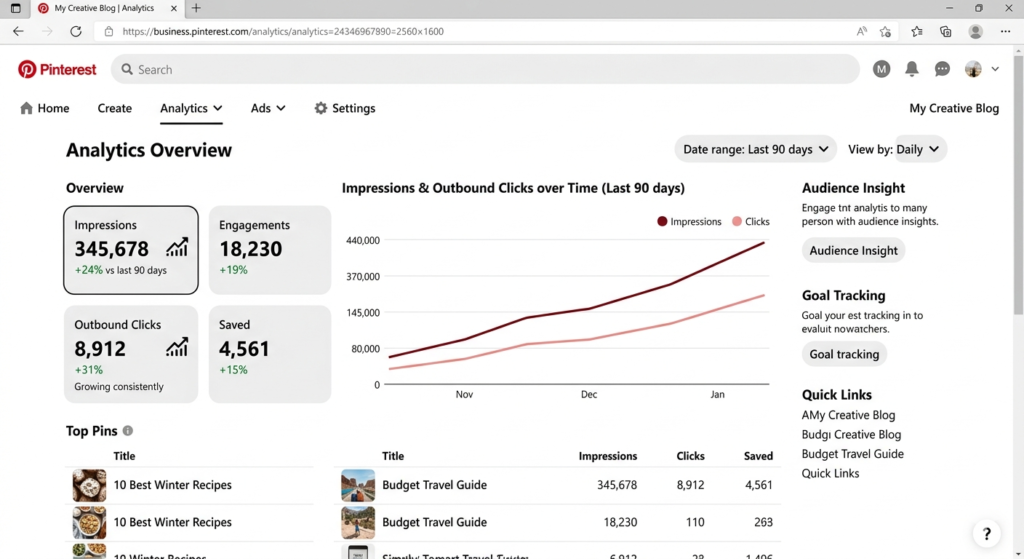
Why Pinterest Is Powerful for Bloggers
Many people mistakenly believe Pinterest is just a platform for recipes, fashion inspiration, and home décor ideas. While those categories remain popular, Pinterest has evolved into a powerful traffic source for nearly every niche.
Today, successful bloggers use Pinterest to promote content related to:
- Blogging
- SEO
- Artificial Intelligence
- Technology
- Personal Finance
- Health and Fitness
- Education
- Digital Marketing
- Online Business
- Productivity
Pinterest users typically visit the platform with a purpose. They are searching for answers, ideas, and solutions. This creates a significant opportunity for bloggers to attract visitors who are already interested in their content.
If you’re new to AI and want to understand the technology behind many modern blogging and marketing tools, check out our guide on Artificial Intelligence Explained in Simple Words.
Key Benefits of Pinterest Traffic
| Benefit | Why It Matters |
|---|---|
| Long-Term Traffic | Pins can generate visitors for months or years |
| Free Traffic Source | No advertising budget required |
| High Purchase Intent | Users actively search for solutions |
| Easy to Scale | Multiple pins can be created from one article |
| Beginner Friendly | Easier to gain visibility compared to many social platforms |
Pinterest vs Traditional Social Media
Most social media posts disappear from users’ feeds within hours.
Pinterest works differently.
A well-optimized pin can continue appearing in search results long after it is published. This means your content has a much longer lifespan compared to platforms like Facebook, Instagram, or X.
For bloggers, this creates a compounding effect where older pins can continue sending traffic while new content is added.
Understanding Pinterest Traffic Potential
Before aiming for 10,000 monthly visitors, it’s important to understand how Pinterest’s algorithm works.
Pinterest evaluates content based on several factors:
- Relevance
- Keywords
- Engagement
- Pin quality
- Website quality
- Account authority
When someone searches for a topic, Pinterest attempts to show the most relevant pins based on these signals.
Before implementing the tips in this guide, it’s helpful to understand a complete Pinterest Traffic Strategy that explains how Pinterest can become a long-term source of website visitors.
How Pinterest Traffic Grows
Most Pinterest accounts don’t go viral overnight.
Traffic growth usually follows this pattern:
Month 1
- Account setup
- Keyword research
- Initial pin creation
Month 2
- Pinterest begins indexing pins
- Impressions start increasing
Month 3
- Some pins gain traction
- First significant traffic increases appear
Month 4–6
- Stronger keyword rankings
- More consistent traffic growth
Month 6+
- Potential to reach thousands of monthly visitors
This is why consistency matters more than short-term results.
Example Scenario
Imagine you publish a blog post titled:
“Best AI Tools for Bloggers”
Instead of creating only one pin, you create:
- A list-style pin
- A comparison pin
- A tutorial pin
- A minimalist pin
- A case-study pin
Each pin targets slightly different keywords and user interests.
Over time, these pins increase your chances of appearing in Pinterest search results and driving traffic to your blog.
Step 1: Create a Pinterest Business Account
The first step toward Pinterest growth is setting up a Pinterest Business Account.
Many beginners use a personal account, but a business account provides access to valuable features that can help you grow faster.
Benefits of a Business Account
- Pinterest Analytics
- Audience Insights
- Rich Pins
- Website Claiming
- Advertising Options
- Performance Tracking
The good news is that creating a Pinterest Business Account is completely free.
Why Analytics Matter
Without analytics, you’re essentially guessing.
Pinterest Analytics helps you understand:
- Which pins perform best
- What content your audience prefers
- Which keywords generate impressions
- How much traffic Pinterest sends to your website
These insights allow you to make smarter content decisions over time.
Pro Tip
Set up your business account before publishing pins. This ensures all future data is tracked correctly from the beginning.
Step 2: Claim Your Website
Website claiming is one of the most overlooked Pinterest optimization steps.
When you claim your website, Pinterest verifies that you own the domain.
This simple action offers several important benefits.
Benefits of Claiming Your Website
- Increased trust and credibility
- Access to website-specific analytics
- Better brand visibility
- Improved performance tracking
- Enhanced Pinterest authority signals
Why This Matters
Pinterest wants to connect high-quality content with users.
Claiming your website helps establish authenticity and allows Pinterest to associate your content directly with your account.
For bloggers who want long-term growth, this is a foundational step that should never be skipped.
What Happens After Claiming?
Once your website is verified:
- Your profile picture appears on content shared from your site.
- Pinterest can better understand your content.
- You gain deeper insights into traffic performance.
This creates a stronger connection between your Pinterest account and your blog.
Step 3: Perform Pinterest Keyword Research
Pinterest SEO begins with keyword research.
Because Pinterest operates as a search engine, keywords help the platform understand what your content is about.
Without proper keyword research, even great pins may struggle to gain visibility.
How to Find Pinterest Keywords
The easiest method is using Pinterest’s search bar.
Simply type a broad keyword related to your niche.
For example:
Blogging
Pinterest may suggest:
- Blogging Tips
- Blogging for Beginners
- Blogging Strategy
- Blogging Tools
- Blogging Income
These suggestions come directly from real user searches.
Additional Keyword Sources
You can also find keyword ideas through:
- Pinterest Trends
- Competitor profiles
- Popular boards
- Related search suggestions
- Pinterest search filters
Keyword Research Example
Suppose your blog focuses on AI.
Potential keywords might include:
- AI Tools
- AI for Bloggers
- AI Writing Tools
- ChatGPT Blogging
- AI Content Creation
- AI Productivity Tools
These keywords can later be incorporated into:
- Pin titles
- Pin descriptions
- Board names
- Profile descriptions
Common Keyword Research Mistakes
Avoid:
- Using extremely broad keywords
- Ignoring long-tail keywords
- Keyword stuffing
- Copying competitors exactly
Instead, focus on relevance and user intent.
Step 4: Optimize Your Pinterest Profile
Your Pinterest profile helps both users and Pinterest understand your expertise.
A poorly optimized profile can limit your visibility.
Elements of a Strong Pinterest Profile
Profile Photo
Use:
- A professional headshot
- A recognizable brand logo
Consistency helps build trust.
Username
Choose a username that aligns with your brand.
Example:
AI With Sahil
Bio
Your bio should clearly explain:
- What your content covers
- Who it helps
- Why people should follow you
Example Pinterest Bio
Helping bloggers grow traffic with SEO, Pinterest marketing, AI tools, and content creation strategies.
Add Relevant Keywords
Naturally include keywords related to your niche.
For example:
- Blogging Tips
- Pinterest Marketing
- SEO Strategies
- AI Blogging
This helps Pinterest categorize your account correctly.
Profile Optimization Checklist
✔ Professional profile image
✔ Keyword-rich bio
✔ Website added
✔ Consistent branding
✔ Clear niche focus
✔ Business account setup
A properly optimized profile lays the foundation for long-term Pinterest growth and prepares your account for the advanced strategies covered in the next section.
Step 5: Create High-Quality Pinterest Boards
Pinterest boards help organize your content and tell Pinterest what topics you focus on. Think of boards as categories on your blog.
A well-structured board system can significantly improve your visibility in Pinterest search results.
Why Pinterest Boards Matter
Pinterest uses board titles and descriptions to understand your content.
When your boards are properly optimized, Pinterest can recommend your pins to the right audience.
Board Ideas for Bloggers
If you run a blogging or digital marketing website, consider creating boards such as:
- Blogging Tips
- Pinterest Marketing
- SEO Strategies
- AI Tools for Bloggers
- Content Writing Tips
- Affiliate Marketing
- Email Marketing
- Online Business Ideas
- Passive Income Tips
How to Optimize Board Titles
Use clear and keyword-focused titles.
Good Examples:
✔ Pinterest Marketing Tips
✔ Blogging for Beginners
✔ SEO Strategies for Bloggers
Avoid:
✘ Cool Stuff
✘ My Favorites
✘ Random Ideas
These titles don’t help Pinterest understand your content.
Writing Board Descriptions
A board description should naturally include your target keywords.
Example:
“This board shares Pinterest marketing tips, Pinterest SEO strategies, traffic growth techniques, and content promotion ideas for bloggers.”
Best Practices for Boards
- Create niche-specific boards
- Use keyword-rich descriptions
- Keep boards organized
- Save relevant content consistently
- Avoid unrelated topics
The more relevant your boards are, the easier it becomes for Pinterest to categorize your content.
Step 6: Design Click-Worthy Pins
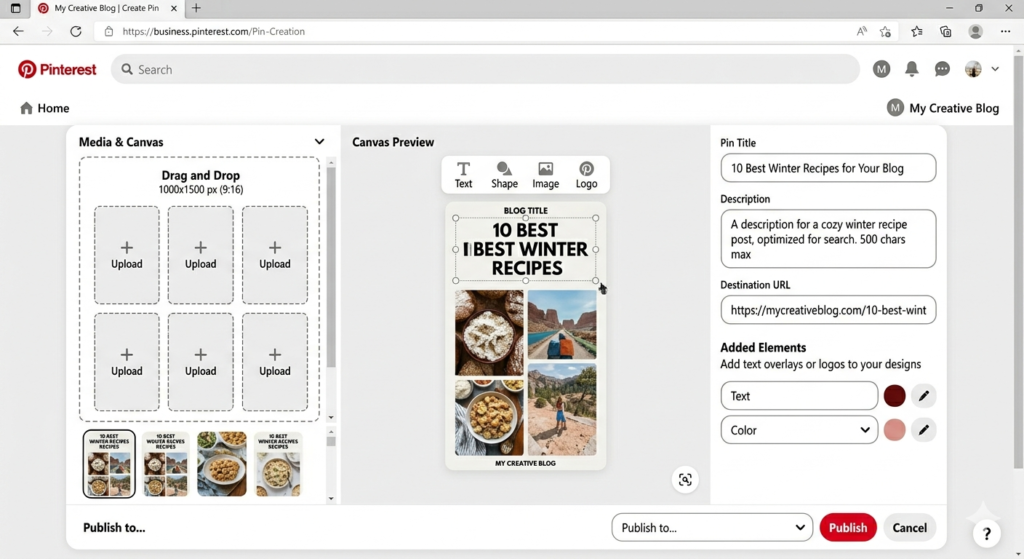
Pin design is one of the most important factors in Pinterest success.
Even if your content is excellent, poor pin design can reduce clicks dramatically.
Pinterest users decide within seconds whether a pin is worth clicking.
Elements of a High-Converting Pin
Clear Headline
Your headline should immediately communicate value.
Examples:
- 15 Pinterest Marketing Tips for Beginners
- How to Get More Blog Traffic from Pinterest
- Best AI Tools for Content Creators
Readable Fonts
Avoid decorative fonts that are difficult to read.
Use clean and professional typography.
Strong Contrast
Your text should stand out from the background.
High contrast improves readability and click-through rates.
Vertical Format
Pinterest recommends:
1000 × 1500 pixels
Vertical pins generally perform better than square or horizontal images.
Pin Design Formula
Most successful Pinterest pins follow this structure:
- Attention-grabbing title
- Relevant image or graphic
- Brand name or logo
- Simple layout
- Clear visual hierarchy
Pin Design Tools
Popular tools include:
- Canva
- Adobe Express
- Figma
- Photoshop
Canva is often the easiest option for beginners.
Common Design Mistakes
Avoid:
- Too much text
- Low-quality images
- Cluttered layouts
- Small fonts
- Excessive colors
Remember, simplicity often performs best.
Step 7: Create Multiple Pins for Every Blog Post
One of the biggest Pinterest traffic secrets is creating multiple pins for a single article.
Many beginners publish one pin and move on.
Successful bloggers do the opposite.
Why Multiple Pins Work
Different users respond to different designs.
A pin that performs poorly with one audience may perform extremely well with another.
Creating multiple versions increases your chances of success.
Example
Blog Post:
“Best AI Tools for Bloggers”
Possible Pin Variations:
Version 1
List Style
“15 Best AI Tools for Bloggers”
Version 2
Problem-Solution Style
“Struggling to Write Faster? Try These AI Tools”
Version 3
Comparison Style
“Top AI Tools Compared for Bloggers”
Version 4
Beginner Guide
“AI Tools Every New Blogger Should Use”
Version 5
Case Study Style
“How AI Helped Me Create Content Faster”
Each variation targets different search intent and user interests.
Recommended Number of Pins
For every blog post:
- Minimum: 3 pins
- Ideal: 5–10 pins
This strategy alone can dramatically increase Pinterest traffic.
Step 8: Master Pinterest SEO
Pinterest SEO is one of the most important factors in reaching 10,000 monthly visitors.
Pinterest needs clear signals to understand what your content is about.
Areas to Optimize
Pin Title
Include your primary keyword naturally.
Example:
How to Get 10,000 Monthly Visitors from Pinterest
Pin Description
Add:
- Primary keyword
- Related keywords
- User benefits
Example:
“Learn how to get 10,000 monthly visitors from Pinterest using proven Pinterest SEO techniques, keyword research, and pin design strategies.”
Board Titles
Board names should contain relevant keywords.
Examples:
- Pinterest SEO
- Blogging Tips
- Content Marketing
Board Descriptions
Use natural keyword placement.
Avoid stuffing keywords unnaturally.
Profile Bio
Include keywords that describe your niche.
Image File Names
Instead of:
image123.jpg
Use:
pinterest-traffic-strategy.jpg
Although it’s a small factor, every optimization helps.
Pinterest SEO Checklist
Before publishing a pin, verify:
✔ Keyword in title
✔ Keyword in description
✔ Relevant board selected
✔ Optimized image filename
✔ Strong headline
✔ Click-worthy design
✔ Website link included
This simple checklist improves consistency and discoverability.
Step 9: Publish Pins Consistently
Pinterest prefers active accounts that regularly publish fresh content.
How Often Should You Pin?
A common question is:
“How many pins should I publish each day?”
The answer depends on your experience level.
| Experience Level | Pins Per Day |
|---|---|
| Beginner | 5–10 |
| Intermediate | 10–20 |
| Advanced | 20–40 |
Quality remains more important than quantity.
Why Consistency Matters
Consistent activity helps Pinterest:
- Understand your niche
- Trust your account
- Distribute your content
- Improve ranking opportunities
Publishing 5 pins daily is often better than posting 100 pins once per month.
Creating a Pinning Schedule
Example Weekly Schedule:
Monday
- Publish 2 new pins
- Save 3 existing pins
Tuesday
- Publish 2 new pins
- Update older content
Wednesday
- Publish 3 new pins
Thursday
- Analyze top-performing pins
Friday
- Publish fresh pin designs
Weekend
- Schedule content for next week
This simple workflow keeps your account active without becoming overwhelming.
Using Pinterest Analytics to Improve Results
Consistency alone isn’t enough.
You should also monitor performance regularly.
Key metrics include:
Impressions
Shows how often your pins appear in feeds and search results.
Saves
Indicates user interest.
Outbound Clicks
The most important metric for bloggers.
Clicks generate website traffic.
Engagement Rate
Measures how users interact with your content.
Top Performing Pins
Identify winning designs and create similar content.
Example
If one pin receives significantly more clicks than others:
- Analyze the design
- Study the headline
- Review keyword usage
- Create similar variations
This approach allows you to scale what already works.
Quick Action Plan for Part 2
By now you should:
✔ Create keyword-focused boards
✔ Design attractive vertical pins
✔ Create multiple pins for each article
✔ Optimize every pin for Pinterest SEO
✔ Publish consistently every week
✔ Monitor analytics regularly
These strategies form the core of Pinterest growth and can dramatically increase your chances of reaching 10,000 monthly visitors.
How to Get 10,000 Monthly Visitors from Pinterest in 2026 (Part 3)
Step 10: Focus on Evergreen Content
If your goal is to reach 10,000 monthly visitors from Pinterest, evergreen content should be a major part of your strategy.
Evergreen content remains useful and relevant for a long time. Unlike trending topics that quickly lose interest, evergreen articles can continue generating traffic for months or even years.
Examples of Evergreen Content
- Blogging Tips
- SEO Guides
- Pinterest Marketing Tutorials
- Affiliate Marketing Strategies
- Email Marketing Tips
- AI Tools for Bloggers
- Productivity Hacks
- Content Writing Guides
Why Evergreen Content Performs Better
Pinterest users often search for solutions to ongoing problems.
For example:
A guide titled “How to Start a Blog in 2026” may continue receiving traffic long after it is published because people are constantly searching for blogging advice.
Evergreen Content Tips
- Solve a specific problem
- Use step-by-step instructions
- Update content regularly
- Include screenshots and examples
- Target long-tail keywords
The more helpful your content is, the longer it can generate Pinterest traffic.
Step 11: Analyze Pinterest Analytics
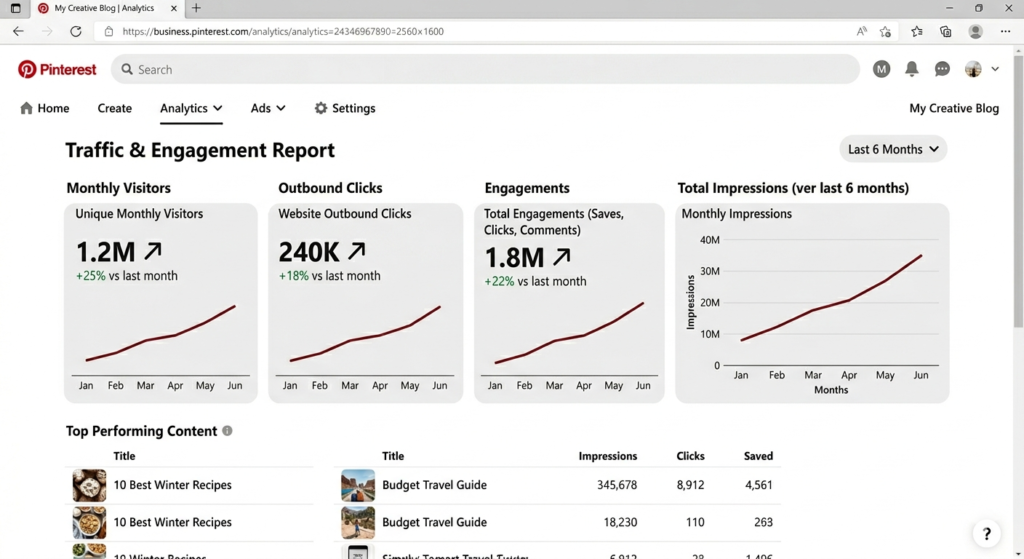
Successful Pinterest marketers don’t rely on guesswork.
They use data to understand what works and what doesn’t.
Pinterest Analytics provides valuable insights that can help improve your results over time.
Metrics You Should Track
Impressions
Shows how often your pins appear in search results and feeds.
Saves
Indicates that users found your content valuable enough to save.
Outbound Clicks
This is the most important metric for bloggers.
More outbound clicks mean more website visitors.
Engagement Rate
Measures how users interact with your pins.
How to Use Analytics Effectively
Review your analytics every week.
Ask yourself:
- Which pins get the most clicks?
- Which keywords drive impressions?
- Which topics perform best?
- Which pin designs generate engagement?
Then create more content based on those findings.
Pro Tip
Don’t focus only on impressions.
A pin with fewer impressions but more outbound clicks is often more valuable than a pin with massive reach but little traffic.
Step 12: Learn From Competitors
Competitor research can dramatically shorten your learning curve.
Instead of guessing what works, study successful accounts in your niche.
What to Analyze
- Board structure
- Pin designs
- Headlines
- Posting frequency
- Content categories
- Keyword usage
Questions to Ask
- Which pins receive the most engagement?
- What type of headlines are working?
- Which content topics appear repeatedly?
- What design style gets attention?
Important Note
Never copy competitors directly.
Instead:
- Learn from their strategy
- Create original content
- Improve on existing ideas
This approach helps you develop your own Pinterest growth system.
Real-World Pinterest Traffic Case Study
Let’s look at a realistic example.
Starting Situation
A blogging website had:
- 30 published articles
- Very little Pinterest traffic
- Minimal social media presence
Strategy Implemented
The blogger:
- Optimized Pinterest profile
- Created keyword-focused boards
- Published 5–10 pins daily
- Designed multiple pins per article
- Focused on evergreen content
- Monitored Pinterest Analytics weekly
Results After Six Months
| Metric | Result |
|---|---|
| Monthly Views | 150,000+ |
| Outbound Clicks | 12,000+ |
| Monthly Blog Visitors | 10,000+ |
| Email Subscribers | Significant Growth |
Key Takeaway
The growth didn’t happen because of one viral pin.
It happened because of consistent effort, proper Pinterest SEO, and continuous optimization.
Common Pinterest Mistakes to Avoid
Many bloggers slow their growth by making avoidable mistakes.
1. Ignoring Keyword Research
Pinterest is a search engine.
Without keywords, your content may never reach the right audience.
2. Creating Only One Pin Per Post
Multiple pin variations increase visibility and traffic opportunities.
3. Using Low-Quality Designs
Poor visuals reduce clicks and engagement.
4. Posting Inconsistently
Consistency is more important than occasional bursts of activity.
5. Ignoring Analytics
Without data, it’s difficult to improve performance.
6. Focusing Only on Trends
Trending content can bring temporary traffic.
Evergreen content creates long-term growth.
7. Expecting Instant Results
Pinterest usually requires several months of consistent effort before significant traffic appears.
Patience is essential.
Advanced Pinterest Growth Strategies
Once you start receiving traffic, use advanced strategies to accelerate growth.
Create Content Clusters
Content clusters help build topical authority.
Example:
Main Topic:
Pinterest Marketing
Supporting Articles:
- Pinterest SEO Guide
- Pinterest Keyword Research
- Pinterest Analytics Tutorial
- Pinterest Pin Design Tips
- Pinterest Growth Strategy
This structure strengthens your overall authority.
Use Seasonal Content
Seasonal content can generate spikes in traffic.
Examples:
- New Year Blogging Goals
- Black Friday Marketing Tips
- Christmas Content Ideas
- Summer Marketing Strategies
Refresh Old Pins
Many bloggers ignore older content.
Instead:
- Update designs
- Improve headlines
- Add fresh keywords
- Republish optimized versions
Refreshing old content often produces surprising results.
Build a Pinterest Content System
Create a workflow:
- Publish blog post
- Design 5–10 pins
- Optimize keywords
- Schedule content
- Track analytics
- Improve top-performing pins
A repeatable system makes scaling much easier.
Many bloggers also use AI Tools for Digital Marketing to streamline content creation, keyword research, and marketing workflows, allowing them to focus more on traffic growth.
Helpful Resources
Pinterest regularly updates its best practices and tools.
You can learn more through:
Pinterest Business Help Center:
https://business.pinterest.com/en/help
Pinterest Trends:
https://trends.pinterest.com
These resources can help you stay updated with the latest Pinterest features and search trends.
Frequently Asked Questions
How long does it take to get 10,000 monthly visitors from Pinterest?
Most bloggers can achieve this within 4–12 months depending on content quality, niche competition, and consistency.
Is Pinterest still worth using in 2026?
Yes. Pinterest remains one of the best free traffic sources for bloggers, affiliate marketers, and content creators.
How many pins should I post each day?
Beginners can start with 5–10 pins daily and gradually increase as they gain experience.
Do I need Pinterest ads?
No. Many successful bloggers generate thousands of visitors through organic Pinterest SEO alone.
What type of content performs best on Pinterest?
Evergreen content such as tutorials, guides, checklists, and educational articles tends to perform exceptionally well.
Can Pinterest traffic help my blog grow faster?
Yes. Pinterest can provide targeted visitors, increase brand awareness, and support overall content marketing efforts.
Should I create multiple pins for one article?
Absolutely. Multiple pin variations improve visibility and increase traffic opportunities.
What is the most important Pinterest ranking factor?
Relevance, keyword optimization, engagement, content quality, and consistency all play important roles.
If you’re just starting your blogging journey, you may also find our guide on How to Start a Blog Using Only Your Smartphone helpful for building and growing a blog with minimal resources.
Conclusion
Learning how to get 10,000 monthly visitors from Pinterest is not about finding shortcuts or secret hacks. It is about building a sustainable strategy based on quality content, Pinterest SEO, consistency, and continuous improvement.
By creating a Pinterest Business account, optimizing your profile, performing keyword research, designing click-worthy pins, publishing consistently, and analyzing your results, you can steadily increase your traffic over time.
Remember that Pinterest rewards creators who provide value and remain consistent. A single optimized pin can continue driving visitors for months or even years, making Pinterest one of the most powerful long-term traffic sources available to bloggers.
Start implementing the strategies discussed in this guide today, stay patient with the process, and focus on helping your audience. With consistent effort, reaching 10,000 monthly visitors from Pinterest can become a realistic and achievable milestone for your blog.