
Best Free AI Tools for Students in India 2026 me students ke liye learning, research, note-taking, coding aur productivity ko improve karne ka sabse smart tareeka ban chuke hain. Agar aap school, college ya competitive exam student hain, to ye free AI tools aapki study efficiency ko kaafi improve kar sakte hain.
In 2026, students across India are using AI tools to prepare for exams, create notes, write assignments, improve English, learn coding, make presentations, and manage their studies more efficiently.
Whether you’re a school student, college student, engineering student, UPSC aspirant, NEET candidate, or preparing for government exams, AI can help you save time and learn more effectively.
The best part is that many powerful AI tools offer free plans, making them accessible to students without spending money.
In this guide, we’ll explore the best free AI tools for students in India, their features, benefits, practical use cases, and how you can use them responsibly to improve your academic performance.
If you’re looking for more advanced options, explore our complete guide to the best AI tools 2026for students, creators, and professionals.
Table of Contents
- Why Students Should Use AI Tools
- Benefits of AI in Education
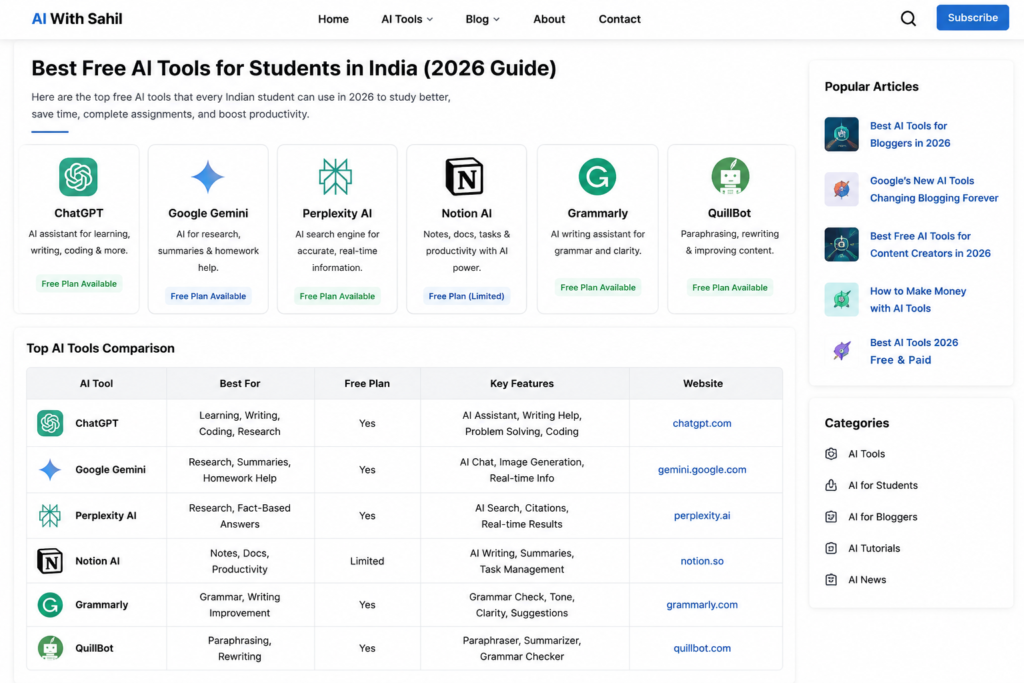
- Best Free AI Tools for Students
- ChatGPT
- Google Gemini
- Perplexity AI
- Notion AI
- Grammarly
- QuillBot
- More AI Tools (Part 2)
- Comparison Table
- Student Success Examples
- FAQs
- Conclusion
Why Students Should Use AI Tools in 2026
The education system is becoming more competitive every year.
Students are expected to:
- Learn faster
- Complete assignments on time
- Improve communication skills
- Stay updated with technology
- Manage multiple subjects simultaneously
This is where AI tools become valuable.
Instead of spending hours searching for information, students can get explanations, summaries, and learning support within seconds.
AI doesn’t replace learning.
It simply helps students learn smarter.
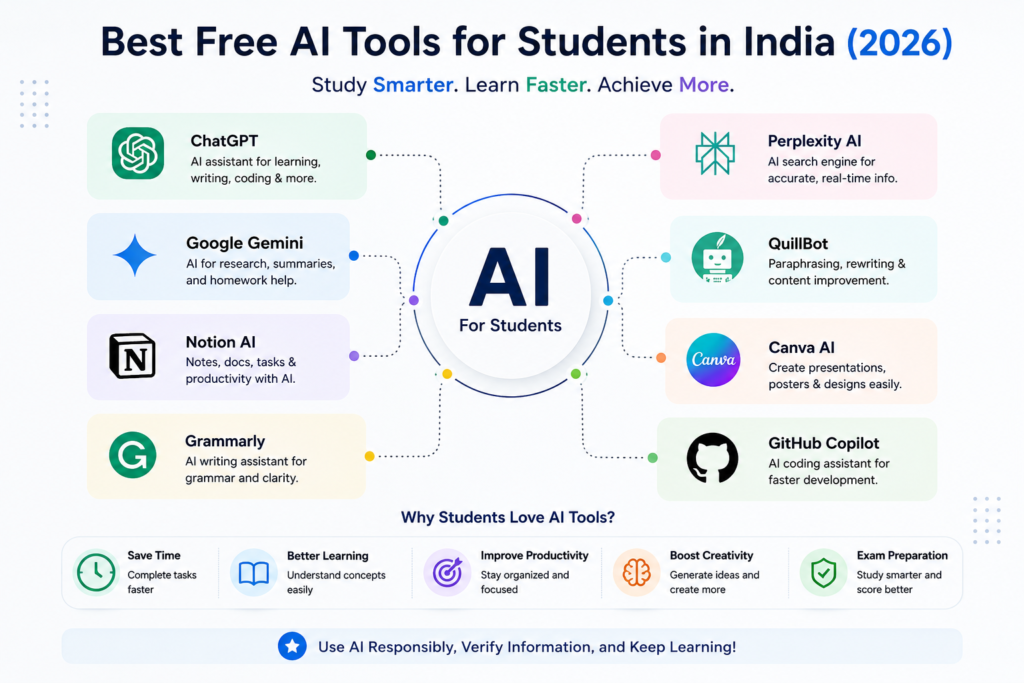
The Best Free AI Tools for Students in India help learners save time and improve study efficiency.
Major Benefits of AI Tools for Students
| Benefit | How AI Helps |
|---|---|
| Faster Learning | Summarizes complex topics |
| Better Writing | Improves grammar and clarity |
| Research Support | Finds information quickly |
| Productivity | Automates repetitive tasks |
| Exam Preparation | Creates practice questions |
| Coding Help | Explains programming concepts |
| Presentation Creation | Generates slides quickly |
How AI is Changing Education in India
Students in India are increasingly adopting AI tools because:
- Online education is growing rapidly
- Competitive exams require smarter preparation
- Digital skills are becoming essential
- AI literacy is becoming a career advantage
Today, students who understand how to use AI effectively often have a productivity advantage over those who don’t.
However, successful students use AI as a learning assistant—not as a shortcut.
1. ChatGPT
Best For: Learning, Assignments, Writing, Coding, and Exam Preparation
ChatGPT remains one of the most powerful AI tools available for students in 2026.
It can explain difficult concepts, answer questions, generate notes, solve coding problems, create study plans, and assist with academic writing.
The biggest advantage of ChatGPT is its versatility.
Whether you’re studying mathematics, science, commerce, history, programming, or English, ChatGPT can help simplify complex concepts.
Key Features
- Instant answers
- Topic explanations
- Assignment assistance
- Coding support
- Content summarization
- Language learning
- Study planning
Example Use Case
Imagine you’re preparing for a Physics exam and struggling with Newton’s Laws of Motion.
Instead of reading multiple websites, you can simply ask:
“Explain Newton’s Laws of Motion with simple real-life examples.”
Within seconds, you’ll get a simplified explanation that’s easier to understand.
Advantages
✔ Easy to use
✔ Free version available
✔ Supports multiple subjects
✔ Great for research
✔ Excellent for exam preparation
Limitations
✘ Can occasionally provide incorrect information
✘ Important facts should always be verified
Pro Tip
Instead of asking:
“Explain Biology”
Ask:
“Explain Photosynthesis in simple language for Class 10 students.”
Specific prompts produce better results.
ChatGPT is one of the Best Free AI Tools for Students in India because it supports learning, writing, and research.
Want to explore the official ChatGPT platform? Visit the ChatGPT official website to learn more about its latest AI features and student-friendly tools.
2. Google Gemini
Best For: Research and Academic Projects
Google Gemini has become a popular AI assistant among Indian students.
Because it’s connected with Google’s ecosystem, Gemini is particularly useful for research, brainstorming, and project work.
Students can use Gemini to summarize information, generate ideas, and explore topics more deeply.
Key Features
- AI-powered research
- Smart summaries
- Project assistance
- Study support
- Content generation
Why Students Like Gemini
Many students already use Google products such as:
- Google Docs
- Google Drive
- Google Search
- Gmail
Gemini integrates naturally into this ecosystem, making it convenient for daily academic tasks.
Example Use Case
Suppose you’re creating a college project about Artificial Intelligence.
Gemini can help:
- Research the topic
- Create an outline
- Suggest presentation points
- Summarize findings
This saves significant time during project preparation.
Advantages
✔ Easy Google integration
✔ Fast research support
✔ User-friendly interface
✔ Free access available
Limitations
✘ Some advanced features require paid plans
✘ Should not replace original research
Google continues to innovate rapidly, and these Google’s new AI tools are already changing how students and bloggers work online.
3. Perplexity AI
Best For: Fact-Based Research and Academic Studies
Perplexity AI has become one of the most trusted AI research tools.
Unlike many chatbots, Perplexity often provides source references along with answers.
This makes it particularly useful for students who need reliable information for assignments and research projects.
Key Features
- Source-backed answers
- Academic research support
- Fast information retrieval
- Content summarization
- Question answering
Why It Stands Out
One major challenge with AI tools is accuracy.
Perplexity addresses this by showing sources that users can verify.
This makes it useful for:
- College assignments
- Research papers
- Project reports
- Academic presentations
Example Use Case
A student preparing a report on renewable energy can use Perplexity to quickly gather information and identify trustworthy sources for further reading.
Advantages
✔ Reliable research support
✔ Fast responses
✔ Source references
✔ Great for academic work
Limitations
✘ Not all sources are academic journals
✘ Information should still be verified
4. Notion AI
Best For: Notes, Productivity, and Study Organization
Managing study materials can be difficult when you’re handling multiple subjects.
Notion AI helps students stay organized by combining note-taking, task management, and AI-powered assistance in one platform.
Key Features
- AI note summaries
- Task management
- Project planning
- Smart writing assistance
- Knowledge organization
How Students Use Notion AI
Students can create:
- Subject-wise notes
- Assignment trackers
- Semester plans
- Revision schedules
- Research databases
Everything remains organized in a single workspace.
Example Use Case
A UPSC aspirant can maintain separate sections for:
- Current affairs
- Polity
- History
- Geography
- Economics
AI can then summarize lengthy notes into concise revision material.
Advantages
✔ Excellent organization
✔ Useful for long-term planning
✔ AI-powered summaries
✔ Great for productivity
Limitations
✘ Learning curve for beginners
✘ Some AI features are limited on free plans
5. Grammarly
Best For: Improving English Writing Skills
Strong communication skills are essential for academic and professional success.
Grammarly helps students improve their writing by identifying grammar mistakes, spelling errors, and awkward sentence structures.
Key Features
- Grammar checking
- Spell correction
- Tone analysis
- Clarity improvements
- Vocabulary suggestions
Who Should Use Grammarly?
- School students
- College students
- Content writers
- Bloggers
- Scholarship applicants
Example Use Case
If you’re writing an assignment or essay, Grammarly can instantly highlight errors and suggest better alternatives.
This improves readability and professionalism.
Advantages
✔ Easy to use
✔ Real-time corrections
✔ Free version available
✔ Improves writing quality
Limitations
✘ Advanced features require premium access
✘ Doesn’t replace human editing completely
6. QuillBot
Best For: Paraphrasing and Summarizing Content
QuillBot is one of the most popular AI writing assistants among students.
It helps rewrite content in different styles while maintaining the original meaning.
Students often use QuillBot to simplify difficult text and improve readability.
Key Features
- Paraphrasing
- Summarization
- Grammar checking
- Citation generation
- Sentence rewriting
Example Use Case
A student reading a complicated academic article can paste a section into QuillBot and generate a simpler version for easier understanding.
Advantages
✔ Improves readability
✔ Multiple writing modes
✔ Helpful summaries
✔ Easy to use
Limitations
✘ Free version has limits
✘ Output should always be reviewed
7. Canva AI
Best For: Presentations, Posters, Infographics, and Design Projects
Canva AI has become one of the most useful tools for students who need professional-looking designs without learning graphic design.
Whether you’re creating a college presentation, project report cover page, resume, poster, or infographic, Canva AI can significantly reduce your workload.
Key Features
- Magic Design
- AI Presentation Generator
- AI Image Generator
- Background Remover
- Resume Builder
- Social Media Graphics
Example Use Case
Suppose your teacher asks you to create a presentation on Climate Change.
Instead of spending hours designing slides manually, Canva AI can generate an entire presentation outline with professional layouts in minutes.
Advantages
✔ Beginner-friendly
✔ Huge template library
✔ Free plan available
✔ Excellent for projects
Limitations
✘ Some premium templates require payment
✘ AI credits may be limited
8. Gamma
Best For: AI-Powered Presentations
Gamma is one of the fastest presentation creation tools available in 2026.
Unlike traditional presentation software, Gamma creates complete slide decks automatically from a simple prompt.
Key Features
- AI Slide Generation
- Professional Layouts
- Smart Content Creation
- Modern Design Templates
- Collaboration Features
Example Prompt
Create a presentation on “Artificial Intelligence in Education” for college students.
Within minutes, Gamma generates:
- Title slide
- Content slides
- Visual elements
- Professional formatting
Advantages
✔ Saves hours of work
✔ Modern presentation designs
✔ Easy editing
✔ Student-friendly
Limitations
✘ Free plan limitations
✘ Advanced customization may require upgrades
9. GitHub Copilot
Best For: Coding and Programming Students
If you’re studying Computer Science, IT, Software Engineering, or Programming, GitHub Copilot can become your coding companion.
It helps write code faster, suggests solutions, and explains programming concepts.
Key Features
- Code Suggestions
- Bug Fixing Assistance
- Function Generation
- Documentation Help
- Learning Support
Supported Languages
- Python
- Java
- JavaScript
- C++
- PHP
- C#
- TypeScript
Example Use Case
A student building a Python calculator project can receive real-time coding suggestions and explanations.
This improves both productivity and learning.
Advantages
✔ Faster coding
✔ Helps beginners learn
✔ Supports multiple languages
✔ Reduces repetitive work
Limitations
✘ Code should always be reviewed
✘ Not a replacement for programming fundamentals
10. Claude
Best For: Deep Explanations and Long Documents
Claude is known for its ability to process large amounts of text and provide detailed explanations.
Students often use Claude for research, summaries, and understanding difficult concepts.
Key Features
- Long Document Analysis
- Detailed Explanations
- Research Assistance
- Summarization
- Writing Support
Example Use Case
A law student can upload a lengthy document and ask Claude to summarize important points.
This saves significant reading time.
Advantages
✔ Detailed responses
✔ Strong reasoning abilities
✔ Excellent summaries
✔ Easy to understand explanations
Limitations
✘ Some features may have usage limits
✘ Requires verification for critical information
11. NotebookLM
Best For: Personalized Study Assistant
NotebookLM is changing how students study.
Unlike traditional AI tools, NotebookLM allows students to upload their own materials and ask questions based on those documents.
Key Features
- PDF Analysis
- Document-Based Questions
- Study Guide Creation
- Note Summaries
- Research Assistance
Example Use Case
Upload:
- Class Notes
- PDFs
- Research Papers
- Study Materials
Then ask:
“What are the most important topics for revision?”
NotebookLM answers using your uploaded content.
Advantages
✔ Personalized learning
✔ Excellent for exam preparation
✔ Smart revision support
✔ Saves study time
Limitations
✘ Depends on uploaded materials
✘ Not suitable for unsupported topics
12. Otter AI
Best For: Lecture Recording and Note-Taking
Many students struggle to write notes while listening to lectures.
Otter AI solves this problem by converting speech into text automatically.
Key Features
- Voice Transcription
- Lecture Recording
- Automatic Notes
- Meeting Summaries
- Searchable Content
Example Use Case
Record a classroom lecture.
Otter AI creates detailed written notes that can later be reviewed for revision.
Advantages
✔ Saves note-taking time
✔ Accurate transcription
✔ Great for revision
✔ Improves productivity
Limitations
✘ Accuracy depends on audio quality
✘ Free plans have limits
13. DeepL
Best For: Translation and Language Learning
DeepL is widely regarded as one of the most accurate translation tools available.
Students learning foreign languages or reading international resources can benefit greatly from it.
Key Features
- Accurate Translation
- Multiple Languages
- Natural Language Processing
- Writing Improvement
Example Use Case
A student reading a French article can instantly translate it into English while maintaining context and meaning.
Advantages
✔ High-quality translations
✔ Natural sentence structure
✔ Easy to use
✔ Helpful for language learners
Limitations
✘ Some advanced features require premium access
14. Khanmigo
Best For: Personalized Tutoring
Khanmigo acts like an AI tutor.
Instead of directly providing answers, it guides students toward understanding concepts through step-by-step learning.
Key Features
- Personalized Guidance
- Math Assistance
- Science Support
- Learning Explanations
- Educational Focus
Example Use Case
A student struggling with algebra can receive hints and explanations rather than direct solutions.
This improves understanding.
Advantages
✔ Encourages learning
✔ Student-friendly
✔ Educational focus
✔ Good for conceptual clarity
Limitations
✘ Limited availability in some regions
✘ Some features may require subscriptions
15. Microsoft Copilot
Best For: Productivity and Microsoft Office Users
Microsoft Copilot integrates with Microsoft Office applications and helps students complete academic tasks faster.
Key Features
- Word Assistance
- PowerPoint Support
- Excel Analysis
- Research Summaries
- Writing Help
Example Use Case
A student preparing a report can use Copilot to:
- Generate outlines
- Improve writing
- Create charts
- Build presentations
Advantages
✔ Strong productivity features
✔ Useful for Office users
✔ Saves time
✔ Beginner-friendly
Limitations
✘ Full features may require Microsoft subscriptions
Comparison Table: Best AI Tools for Students
Below is a comparison of the Best Free AI Tools for Students in India in 2026.
| AI Tool | Best For | Free Plan |
|---|---|---|
| ChatGPT | Learning & Writing | Yes |
| Gemini | Research | Yes |
| Perplexity | Fact-Based Research | Yes |
| Notion AI | Notes & Productivity | Limited |
| Grammarly | Writing Improvement | Yes |
| QuillBot | Paraphrasing | Yes |
| Canva AI | Design & Projects | Yes |
| Gamma | Presentations | Yes |
| GitHub Copilot | Coding | Yes (Students) |
| Claude | Deep Explanations | Yes |
| NotebookLM | Study Materials | Yes |
| Otter AI | Lecture Notes | Yes |
| DeepL | Translation | Yes |
| Khanmigo | Tutoring | Limited |
| Microsoft Copilot | Productivity | Yes |
Best AI Tools Based on Student Needs
For Exam Preparation
- ChatGPT
- NotebookLM
- Claude
- Perplexity
For Assignments
- ChatGPT
- Grammarly
- QuillBot
- Gemini
For Coding Students
- GitHub Copilot
- ChatGPT
- Claude
For Presentations
- Canva AI
- Gamma
- Microsoft Copilot
For Research
- Perplexity AI
- Gemini
- NotebookLM
For Productivity
- Notion AI
- Microsoft Copilot
- Otter AI
Smart AI Workflow for Students
Instead of using only one AI tool, combine multiple tools.
Example Workflow
Step 1:
Research topic using Perplexity AI.
Step 2:
Understand concepts using ChatGPT.
Step 3:
Save notes in Notion AI.
Step 4:
Create summaries using NotebookLM.
Step 5:
Design presentation using Canva AI.
Step 6:
Check grammar using Grammarly.
This workflow can reduce project completion time significantly while improving quality.
Real-Life Student Success Stories
AI tools are helping students across India save time and improve productivity.
Let’s look at some practical examples.
Case Study 1: Engineering Student
Rahul is a second-year engineering student.
Before using AI tools, he spent almost 6–7 hours daily completing assignments and coding projects.
After adopting:
- ChatGPT for explanations
- GitHub Copilot for coding
- Notion AI for note organization
He reduced assignment completion time by nearly 40%.
The extra time helped him prepare for exams and learn additional technical skills.
Case Study 2: UPSC Aspirant
Priya was struggling to manage large volumes of study material.
She started using:
- NotebookLM for revision
- ChatGPT for concept explanations
- Perplexity for current affairs research
As a result, she created faster revision notes and improved information retention.
Case Study 3: College Student
A commerce student needed professional presentations for semester projects.
Using Canva AI and Gamma, she created high-quality presentations within hours instead of days.
This improved both presentation quality and confidence.
How to Use AI Responsibly as a Student
AI can be extremely useful, but students should use it wisely.
Use AI for Learning, Not Copying
The biggest mistake students make is copying answers directly.
Instead, use AI to:
- Understand concepts
- Learn difficult topics
- Generate ideas
- Simplify complex information
Always Verify Information
AI tools can occasionally make mistakes.
Important facts should always be checked from:
- Textbooks
- Official websites
- Academic sources
- Trusted educational platforms
Avoid Plagiarism
Never submit AI-generated content without reviewing and rewriting it.
Use AI as a research assistant rather than a replacement for original work.
Improve Critical Thinking
Ask:
- Why is this answer correct?
- What are the alternatives?
- Can I explain this in my own words?
This develops deeper understanding.
Future of AI in Education
AI is becoming an important part of modern education.
Over the next few years, students will see:
Personalized Learning
AI tutors that adapt to individual learning styles.
Smart Exam Preparation
Customized quizzes and revision plans.
Better Research Tools
Faster access to educational resources.
Interactive Learning
More engaging and practical learning experiences.
Career Readiness
Students familiar with AI tools will have an advantage in future workplaces.
The students who learn how to use AI effectively today will be better prepared for tomorrow’s opportunities.
Actionable Tips to Get Better Results from AI Tools
Use Detailed Prompts
Bad Prompt:
Explain Physics.
Better Prompt:
Explain Newton’s Laws of Motion with simple examples suitable for Class 11 students.
Ask Follow-Up Questions
Learning becomes deeper when you continue the conversation.
Example:
- Explain photosynthesis.
- Give examples.
- Create revision notes.
- Generate MCQs.
Combine Multiple AI Tools
Each AI tool has strengths.
A smart student combines them strategically.
Example:
Research → Perplexity
Learning → ChatGPT
Notes → Notion AI
Revision → NotebookLM
Presentation → Canva AI
Grammar Check → Grammarly
Save Your Best Prompts
Create a document containing useful prompts for:
- Exams
- Assignments
- Coding
- Presentations
- Research
This saves time in the future.
Frequently Asked Questions (FAQs)
1. Which is the best free AI tool for students in India?
ChatGPT is one of the best free AI tools because it supports learning, writing, coding, research, and productivity in a single platform.
2. Are AI tools free for students?
Many AI tools provide free plans, including ChatGPT, Gemini, Canva AI, Perplexity AI, NotebookLM, Grammarly, and Microsoft Copilot.
3. Can students use AI for assignments?
Yes, but AI should be used for research, learning, and idea generation rather than direct copying.
4. Which AI tool is best for exam preparation?
ChatGPT, NotebookLM, Claude, and Perplexity AI are excellent options for exam preparation and revision.
5. Which AI tool is best for coding students?
GitHub Copilot is one of the best AI tools for coding students because it provides intelligent coding suggestions and explanations.
6. Is AI safe for students?
Yes, when used responsibly. Students should avoid sharing sensitive personal information and verify important facts.
7. Which AI tool helps create presentations?
Canva AI and Gamma are among the best tools for creating professional presentations quickly.
8. Can AI improve English writing skills?
Yes. Grammarly, QuillBot, and ChatGPT can significantly improve grammar, vocabulary, clarity, and sentence structure.
9. Which AI tool is best for note-taking?
Notion AI, NotebookLM, and Otter AI are excellent options for note-taking and study organization.
10. Will AI replace teachers?
No. AI is designed to assist learning, while teachers provide guidance, mentorship, experience, and human interaction that AI cannot fully replace.
What are the Best Free AI Tools for Students in India?
The Best Free AI Tools for Students in India include ChatGPT, Gemini, Perplexity, NotebookLM, Canva AI, and Grammarly.
Students who want to explore creative careers can also check these best free AI tools for content creators to improve content creation and digital skills.
Conclusion
Artificial Intelligence is transforming the way students learn, research, write, and prepare for exams. From understanding difficult concepts to creating presentations and organizing study materials, AI tools can save valuable time while improving productivity.
The best free AI tools for students in India in 2026 include ChatGPT, Gemini, Perplexity AI, Notion AI, Grammarly, QuillBot, Canva AI, Gamma, GitHub Copilot, Claude, NotebookLM, Otter AI, DeepL, Khanmigo, and Microsoft Copilot.
However, the real value comes from using these tools responsibly.
Students should focus on learning, understanding, and improving their skills rather than simply generating answers.
Those who combine AI-powered productivity with critical thinking and genuine learning will gain the greatest advantage in academics and future careers.
Students interested in blogging and freelancing can explore these best AI tools for bloggers to improve writing, SEO, and content creation skills.
Start with a few tools that match your needs, experiment with different workflows, and gradually build your AI-powered study system.
The Best Free AI Tools for Students in India can help students learn faster and become more productive.
The future of education is becoming smarter—and AI can help you stay ahead.