
ChatGPT GPT-5.2 Free vs Plus comparison 2026 me kaafi trending topic ban chuka hai. Bahut log confuse hain ki Free version use karein ya Plus upgrade karein. Is detailed guide me hum features, benefits aur login process ko simple Hindi me samjhenge.
Agar aap blogger, student ya content creator ho, to AI tools aaj ke time me optional nahi — essential ban chuke hain. 2026 me AI aur bhi advanced ho gaya hai, aur iss latest update ne kaafi logon ka workflow change kar diya hai.
ChatGPT GPT-5.2 ko develop kiya hai OpenAI ki official website par aap iske latest updates aur announcements dekh sakte hain:
Iss post me hum detail me samjhenge ChatGPT GPT-5.2 Features 2026 kya hain, Free vs Plus plan me kya difference hai, login ka proper tarika kya hai, aur beginners kaise iska smart use kar sakte hain.
Simple Hinglish me, bina technical overload ke. Chaliye start karte hain.
ChatGPT me login karne ke baad agar aap best results chahte hain, to sirf account banana kaafi nahi hota. Aapko sahi tarike se prompts likhna bhi aana chahiye. Yahan detail me samjhein ChatGPT prompt kaise likhe (step-by-step)
Login karne se pehle yeh samajhna zaroori hai ki ChatGPT GPT-5.2 Free vs Plus comparison me aapke liye kaunsa plan suitable hai.
2026 Context: AI Tools Ka Naya Level
2024–2025 me AI tools sirf content writing tak limited the. Lekin 2026 me focus shift ho chuka hai:
- Better reasoning
- Faster responses
- Improved fact-checking
- More human-like tone
- Personalization features
ChatGPT GPT-5.2 Features 2026 ka main highlight hai improved understanding aur structured outputs. Ab ye sirf answers nahi deta — strategy suggest karta hai.
Agar aap ChatGPT GPT-5.2 ka use karke SEO-friendly blog banana chahte hain, to yeh detailed guide zaroor padhein – ChatGPT se blog post kaise likhe (2026 guide)
Example:
Agar aap blog likh rahe ho “how to start blogging in India 2026”, to ye tool sirf generic tips nahi dega. Ye aapko:
- Search intent breakdown
- Low competition keyword ideas
- SEO structure
- Readability improvement suggestions
bhi de sakta hai.
Isliye beginners ke liye ye version kaafi powerful ban chuka hai.
GPT-5.2 Thinking kya hai?
Explanation:
Thinking mode ya advanced reasoning mode complex problems ke liye design hota hai.
Ye helpful hota hai jab:
- Coding logic solve karna ho
- Deep research article banana ho
- Strategy planning karni ho
- Mathematical reasoning karni ho
Example:
Agar aap puchte ho:
“Mere blog ke liye 6 mahine ka content strategy plan banao with traffic growth target”
Thinking mode structured strategic output de sakta hai.
GPT-5.2 parameters kya hote hain?
Explanation:
Parameters ka matlab hota hai model ke internal configuration numbers jaise:
- Context window size
- Token limit
- Processing capacity
Beginners ko exact numbers jaanna zaroori nahi hota. Important ye hai:
Bigger context window =
Zyada long conversation ya long article handle kar sakta hai.
GPT-5.2 extra high kya hota hai?
Ye usually higher performance configuration ko refer karta hai.
Iska matlab ho sakta hai:
- High accuracy responses
- Complex reasoning
- Heavy data handling
Ye normal casual users ke liye zaroori nahi hota.
Step-by-Step Guide: Kaise Use Kare Smart Way
Agar aap first time use kar rahe ho, to ye simple process follow karo.
Step 1: Account Create Kare
- Official website par jao
- Email se signup karo
- OTP verify karo
- Profile basic setup complete karo
Bas itna hi.
Step 2: Free vs Plus Plan Samjho
Free plan me:
- Limited daily usage
- Standard speed
- Basic features
Plus plan me:
- Faster processing
- Advanced reasoning
- Priority access
- Better long-form outputs
Agar aap serious blogger ho ya freelancing karte ho, paid plan worth ho sakta hai.
Step 3: Sahi Prompt Likho
Galat tareeka:
“Blog likh do.”
Sahi tareeka:
“Indian beginners ke liye 1000 words ka SEO-friendly blog likho, simple Hinglish me, actionable steps ke saath.”
Jitna clear prompt, utna better output.
Step 4: Output Ko Direct Publish Mat Karo
Yeh sabse important hai.
AI ka content:
- Edit karo
- Personal examples add karo
- Human touch do
- Apna experience mix karo
Tabhi Google helpful content standards match honge.
Free vs Plus: Detailed Comparison
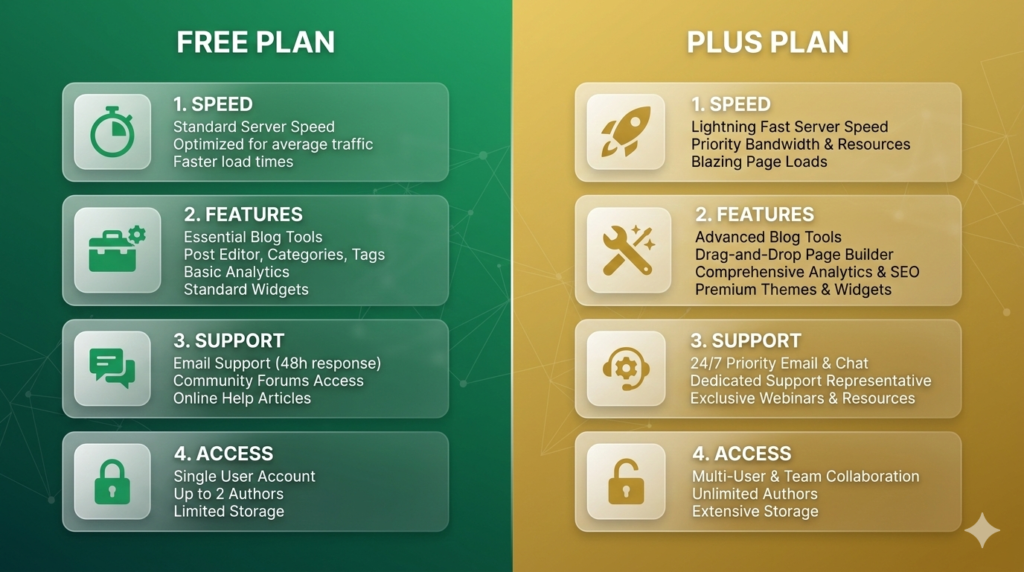
2026 me sabse common confusion hai — free use kare ya upgrade kare?
Chaliye compare karte hain.
1. Speed
Free version thoda slow ho sakta hai peak hours me.
Plus version generally faster response deta hai.
2. Output Quality
Advanced reasoning aur structured answers paid version me better milte hain.
Example:
Free: Basic blog outline
Plus: SEO optimized structured article with headings
3. Content Depth
Agar aap detailed long-form article likh rahe ho jaise “AI tools for Indian bloggers 2026”, to Plus zyada consistent results deta hai.
4. Research Assistance
Latest version me improved contextual understanding milti hai. ChatGPT GPT-5.2 Features 2026 ka ek major benefit hai better multi-step reasoning.
Yani agar aap puchte ho:
“Low competition blogging niches India 2026 with earning potential”
To ye sirf list nahi dega, balki monetization idea bhi suggest karega.
Chahe aap Free version use karein ya Plus, better results ke liye sahi prompt likhna bahut zaroori hota hai. Yahan seekhein high-ranking blog ke liye ChatGPT prompt kaise likhe:
Chat GPT-5.2 Pro kya hai?
Explanation (Blog me use karne ke liye ready content):
GPT-5.2 Pro ek premium tier version maana jata hai jo heavy users, developers aur enterprises ke liye optimized hota hai. Isme:
- Faster response time
- Higher usage limits
- Advanced reasoning
- Better performance under load
Agar koi freelancer daily 10–15 long articles generate karta hai ya coding projects handle karta hai, to Pro variant unke liye useful ho sakta hai.
SEO Tips: Bloggers Ke Liye Practical Advice
AI tool use karna alag cheez hai. SEO-friendly content banana alag.
Yeh tips follow karo:
1. Search Intent Samjho
User kya chahta hai?
- Information?
- Comparison?
- Tutorial?
- Review?
Example:
“Free vs Plus comparison” = comparison intent
“Login guide” = navigational intent
Dono ko cover karna important hai.
2. Long-Tail Keywords Use Karo
Instead of:
- AI tools
Use:
- best AI tools for Indian bloggers 2026
- how to use AI for SEO writing
- free vs paid AI tool difference
Ye low competition keywords help karte hain ranking me.
3. Keyword Stuffing Avoid Karo
ChatGPT GPT-5.2 Features 2026 ko har paragraph me repeat karna galat hai.
Natural flow maintain karo. Synonyms use karo jaise:
- latest GPT version
- 2026 AI update
- new ChatGPT model
Google readability ko importance deta hai.
4. Real Examples Add Karo
Suppose aap ek college student ho.
Aap likh sakte ho:
“Maine apne tech blog ke liye AI se outline banwayi aur phir manually rewrite kiya. 2 mahine me traffic 30% increase hua.”
Ye practical proof content ko trustworthy banata hai
Common Mistakes + Solutions
Mistake 1: Pure AI Content Copy-Paste
Solution:
- Rewrite in your own voice
- Local examples add karo
- Stats verify karo
Mistake 2: Over-Optimization
Har jagah same phrase daal dena harmful hai.
Instead:
- Semantic variations use karo
- Natural tone rakho
Mistake 3: Weak Prompts
Agar output average aa raha hai, problem tool me nahi — prompt me hai.
Structured instruction do:
- Audience define karo
- Word count mention karo
- Tone specify karo
Mistake 4: Free Plan Se High Expectations
Free plan beginners ke liye perfect hai.
Lekin heavy research, scripting, ya client projects ke liye upgrade helpful ho sakta hai.
Mistake 5: SEO Ignore Karna
Sirf AI pe depend mat raho.
- Headings structure check karo
- Internal linking add karo
- Meta description manually likho
2026 me ranking sirf content se nahi — user experience se hoti hai.
FAQs (Beginner Friendly)
Q1. Is GPT-5.2 free?
Explanation:
Basic version free hota hai with limits.
Free plan me:
- Limited queries
- Standard speed
- Basic access
Paid plan me:
- Higher limits
- Faster processing
- Advanced reasoning
Beginners ke liye free enough hota hai.
Q2. Kya free version blogging ke liye enough hai?
Haan, beginners ke liye kaafi hai. Basic blog outlines aur short content ke liye suitable hai.
Q3. Plus plan kab lena chahiye?
Agar aap freelancer ho, daily long-form content likhte ho, ya clients handle karte ho — tab upgrade useful hai.
Q4. Login issue aa raha ho to kya kare?
- Email check karo
- Password reset try karo
- Browser cache clear karo
- Stable internet use karo
Q5. Kya AI content Google me rank karta hai?
Rank karta hai — agar:
- Helpful ho
- Human-edited ho
- Search intent match kare
Blind AI content usually struggle karta hai.
Q6. Kya students is tool se assignments bana sakte hain?
Use kar sakte hain for understanding topics. Lekin direct copy mat karo. Apni language me rewrite karo.
Q7. 2026 me kya ye tool safe hai beginners ke liye?
Haan, lekin responsible use zaroori hai. Data privacy aur originality ka dhyan rakho.
Sirf content likhna kaafi nahi hota, usse Google me rank bhi karwana zaroori hai. Is detailed guide me dekhein ChatGPT se blog ko Google me rank kaise kare
Conclusion
2026 me AI sirf ek writing assistant nahi — ek smart productivity partner ban chuka hai.

ChatGPT GPT-5.2 Features 2026 ne blogging, studying, aur content creation ko faster aur structured bana diya hai. Lekin yaad rakho:
Tool powerful hai.
Lekin result aapki strategy pe depend karta hai.
Free version beginners ke liye perfect starting point hai.
Plus serious creators ke liye growth accelerator ho sakta hai.
Final verdict ke taur par, agar aap blogging ya professional use karte hain to yeh ChatGPT GPT-5.2 Free vs Plus comparison clearly dikhata hai ki Plus version better option ho sakta hai.