
Introduction
Publishing a blog post is easy. Ranking it on Google is where most bloggers struggle. Learning how to write blog posts with ChatGPT the right way can help you create faster, smarter, and more SEO-friendly content. However, simply copying AI-generated text is not enough if your goal is to rank on search engines.
Publishing a blog post is easy. Ranking it on Google? That is where most people struggle.
Many bloggers use ChatGPT to create content faster, but they often make one major mistake — they copy and paste AI-generated text without strategy. The result? Generic articles that sound robotic, fail to rank, and barely attract traffic.
If you have ever wondered why some AI-written blog posts rank on Google while others disappear into the internet, the answer is simple: strategy matters more than speed.
The good news is that ChatGPT can absolutely help you create blog posts that rank — if you know how to use it correctly.
Whether you are a beginner blogger, affiliate marketer, freelancer, or content creator, learning how to write blog posts with ChatGPT that actually rank can save hours of work while improving your content quality.
In this guide, you will learn:
- How to use ChatGPT for SEO blog writing
- Common mistakes that ruin rankings
- The exact workflow for creating high-quality blog posts
- Tips to make AI content sound human and trustworthy
- Ways to optimize content for Google Search and AI-generated overviews
By the end of this article, you will know how to turn ChatGPT into a smart blogging assistant instead of a shortcut that damages rankings.
Why Most ChatGPT Blog Posts Fail to Rank
Here is the uncomfortable truth:
ChatGPT is powerful, but it is not magic.
Many people expect AI to do all the work. They type a simple prompt like:
“Write a blog post about digital marketing.”
Then they publish whatever comes out.
That approach rarely works.
Google values useful, trustworthy, and experience-driven content. Generic information repeated across hundreds of websites does not stand out anymore.
The Biggest Problems With AI-Written Blog Posts
1. Generic Content
AI often gives broad information that sounds correct but lacks depth.
For example:
A fitness blog may say:
“Exercise is important for health.”
But an article that ranks higher may include:
- Real examples
- Expert opinions
- Case studies
- Practical tips
- Personal experience
Google rewards content that feels genuinely useful.
2. No Search Intent Optimization
Search intent matters.
If someone searches:
“How to write blog posts with ChatGPT”
They are not looking for a random explanation.
They want:
- A step-by-step process
- Examples
- Prompts
- SEO tips
- Ranking strategies
When content does not match search intent, rankings suffer.
3. Robotic Writing Style
One major reason AI content fails is because it feels unnatural.
Readers instantly notice phrases like:
- “In today’s fast-paced digital world…”
- “Unlock the power of…”
- “Delve into…”
These phrases sound repetitive and robotic.
Good blog writing feels conversational, helpful, and easy to understand.
4. Weak EEAT Signals
Google looks for content that demonstrates:
- Experience
- Expertise
- Authoritativeness
- Trustworthiness
This concept is known as EEAT.
For example, imagine two articles about blogging:
Article A simply repeats generic facts.
Article B explains:
“After testing more than 50 ChatGPT-generated articles on niche websites, I noticed one pattern — content with personal examples, custom formatting, and practical tips performed significantly better.”
Which one feels more trustworthy?
Obviously, Article B.
That is exactly what Google prefers.
What Google Actually Wants in Blog Content
Before using ChatGPT, you must understand something important:
Google does not hate AI-generated content.
Google hates low-quality content.
If your content is genuinely helpful, well-written, accurate, and useful, it can rank whether AI helped create it or not.
Here is what strong blog content usually includes.
Helpful Information
Readers should leave with answers.
Ask yourself:
“Will someone feel smarter after reading this?”
If the answer is yes, you are moving in the right direction.
Clear Structure
People do not read blog posts word by word.
They scan.
That is why formatting matters.
Good blog posts include:
- Short paragraphs
- Clear headings
- Bullet points
- Step-by-step sections
- Examples
This improves readability and SEO.
Real-Life Examples
Practical examples make content memorable.
Imagine explaining ChatGPT blog writing without showing how it works.
That would feel incomplete.
Instead, a stronger article includes examples like:
A beginner blogger used ChatGPT to write product comparison articles but saw no traffic for three months. After restructuring content with keyword research, FAQs, and clearer headings, rankings improved within weeks.
Stories create trust.
Search Intent Matching
Every keyword has intent.
Someone searching:
“best blogging tools”
expects recommendations.
Someone searching:
“how to start a blog”
expects a tutorial.
If your article does not satisfy intent, Google notices.
Step 1: Start With Keyword Research Before ChatGPT
This is where successful bloggers separate themselves from everyone else.
Do not open ChatGPT first.
Start with keywords.
Why?
Because ChatGPT cannot magically guess what people are searching for.
You need data.
Find Keywords With Ranking Potential
Look for:
- Long-tail keywords
- Low-competition topics
- Question-based searches
- Related phrases
For example:
Instead of targeting:
“Blogging”
Try:
- “How to write blog posts with ChatGPT”
- “Best ChatGPT prompts for blogging”
- “How to rank AI-written content”
- “SEO blog writing with ChatGPT”
These keywords are more targeted and easier to rank for.
Understand Search Intent First
Before writing, ask:
Why is someone searching this keyword?
For this article, intent is:
Learn how to use ChatGPT for ranking blog posts.
That means readers want:
- Practical strategies
- Step-by-step methods
- SEO advice
- Examples
- Mistakes to avoid
If your article delivers those things, you are more likely to rank.
Build a Content Outline Before Writing
Most beginners skip this.
Bad workflow:
Keyword → ChatGPT → Publish
Better workflow:
Keyword → Search intent → Outline → ChatGPT → Optimization → Publish
For example, an outline for this topic may include:
- Why AI blog posts fail
- Google’s view on AI content
- Keyword research
- Writing workflow
- SEO optimization
- Humanizing AI content
- Mistakes to avoid
- FAQs
Now ChatGPT has structure to follow.
And structured content almost always performs better.
Why Prompt Quality Matters
ChatGPT is only as good as the instructions you give it.
A weak prompt creates weak content.
For example:
Bad prompt:
Write a blog about ChatGPT blogging.
Good prompt:
Write an SEO-friendly, conversational, beginner-friendly article explaining how to write blog posts with ChatGPT that rank on Google. Include examples, practical steps, EEAT principles, FAQs, and SEO optimization tips.
Notice the difference?
The second prompt gives:
- Direction
- Structure
- Audience targeting
- Tone guidance
- SEO goals
Using stronger prompts can dramatically improve content quality, especially if you follow these ChatGPT prompts that help blogs rank faster.
Step 2: Create a Smart Blog Outline With ChatGPT
Once your keyword research is complete, the next step is creating a strong structure.
Think of your blog post like a house.
Without a solid foundation, everything feels messy.
A well-organized outline helps readers stay engaged and also makes it easier for search engines to understand your content.
Instead of asking ChatGPT to write an entire article immediately, ask it to help organize ideas first.
For example, a smart workflow looks like this:
Keyword → Outline → First Draft → Editing → SEO Optimization
This process gives better results than generating random content in one click.
What Makes a Good Blog Outline?
A ranking-friendly blog outline usually includes:
- A clear introduction
- H2 and H3 headings
- Step-by-step explanations
- Real examples
- Actionable tips
- FAQs
For example, if someone searches:
“How to write blog posts with ChatGPT that rank”
They likely want:
- Keyword research tips
- Blog structure guidance
- Prompt examples
- SEO optimization strategies
- Human writing techniques
- Ranking mistakes to avoid
When your article answers all likely questions, readers spend more time on the page — a positive signal for SEO.
Step 3: Write Better Prompts for Better Content
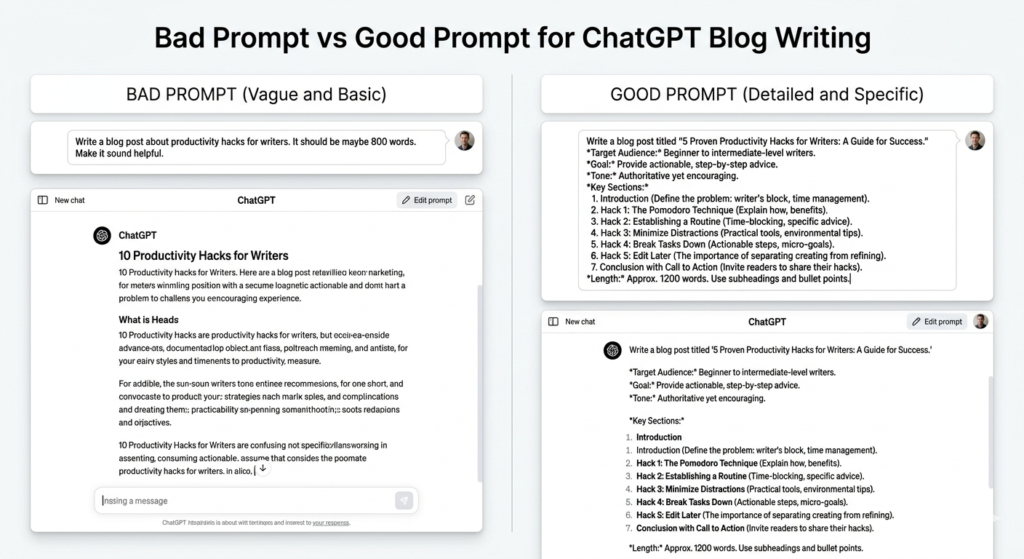
One of the biggest reasons AI-generated content feels robotic is poor prompting.
Many bloggers write prompts like:
“Write a blog post about ChatGPT.”
That is too vague.
ChatGPT works best when instructions are detailed.
Think of it like hiring a writer.
The more context you give, the better the result.
If you are new to prompting, learning how to write ChatGPT prompts can improve content quality and SEO performance significantly.
Example of a Weak Prompt
Write a blog about ChatGPT SEO.
The problem?
- No audience specified
- No tone guidance
- No structure
- No SEO direction
- No examples requested
The output often becomes generic.
Example of a Strong Prompt
Write an SEO-optimized blog post for beginners about how to write blog posts with ChatGPT that rank on Google. Use a conversational tone, include examples, practical tips, FAQs, EEAT principles, and short paragraphs. Format headings with H2 and H3.
See the difference?
Now ChatGPT understands:
- Audience
- Goal
- Structure
- Tone
- SEO requirements
That alone can massively improve content quality.
Use Layered Prompting
Professional bloggers rarely generate a full article in one attempt.
Instead, they use layered prompting.
For example:
First prompt:
Create a detailed outline.
Second prompt:
Expand section one with examples.
Third prompt:
Improve readability and make it more conversational.
Fourth prompt:
Add SEO-friendly FAQs.
This method creates more natural content.
If you are confused about which AI tool works better for content creation, check out our detailed guide on ChatGPT vs Google Gemini for Blogging.
Step 4: Humanize AI Content So It Does Not Sound Robotic
This is where many bloggers fail.
AI content can sound repetitive if you publish it without editing.
Readers quickly lose trust when content feels machine-written.
Here are simple ways to make blog posts feel human.
Use Personal or Practical Examples
Readers connect with stories.
For example:
Instead of saying:
“Good prompts improve content quality.”
Say:
A beginner blogger struggled to rank articles for months because every post sounded generic. After switching to detailed prompts and restructuring articles for search intent, traffic slowly started improving.
Stories feel more believable.
They also improve engagement.
Write Like You Speak
Imagine explaining a topic to a friend.
Simple language works better.
Instead of:
“Leverage advanced prompt engineering methodologies.”
Say:
Use better prompts to get stronger results.
Clear writing almost always wins.
Mix Sentence Length
Robotic writing sounds repetitive.
For example:
Bad writing:
ChatGPT is useful. It saves time. It improves productivity. It helps bloggers. It creates content.
That feels boring.
Better writing:
ChatGPT can save hours of work. But speed alone is not enough. If you want rankings, you still need strategy, structure, and strong SEO basics.
See the difference?
The flow feels more natural.
Add Experience-Based Insights
Google values experience.
Even if you are a beginner, you can include observations such as:
Many bloggers notice better engagement when articles use shorter paragraphs and practical examples instead of generic advice.
That sounds more credible than repeating surface-level information.
Step 5: Optimize Blog Posts for SEO
Writing good content is important.
But optimization matters too.
A great article without SEO may never reach readers.
Here are practical SEO tips for AI-written blog posts.
Add Your Primary Keyword Naturally
Avoid stuffing keywords.
Bad example:
ChatGPT blog writing helps ChatGPT blog writing because ChatGPT blog writing improves ChatGPT blog writing.
That sounds terrible.
Instead, naturally include phrases like:
- How to write blog posts with ChatGPT
- AI blog writing tips
- SEO blog writing with ChatGPT
- ChatGPT blogging workflow
This improves topical relevance.
Use Proper Heading Structure
Good formatting helps readers scan quickly.
Example:
H2: How to Write Blog Posts With ChatGPT
H3: Research Keywords
H3: Create an Outline
H3: Edit for Readability
This structure improves readability and SEO.
Optimize for Featured Snippets
Featured snippets often rank at the top of search results.
One easy trick?
Answer questions directly.
Example:
How do you write a blog post with ChatGPT?
- Research keywords
- Build an outline
- Use detailed prompts
- Edit for human readability
- Optimize for SEO
Short answers increase snippet potential.
Improve Readability
Most successful blog posts are easy to scan.
Use:
- Short paragraphs
- Bullet points
- Simple wording
- Subheadings
- Examples
Remember:
People skim content before reading deeply.
Step 6: Edit Everything Before Publishing
Never publish raw AI output.
Even strong drafts need editing.
Before publishing, check:
Grammar and Clarity
Read the article out loud.
Does it sound natural?
If a sentence feels awkward, rewrite it.
Remove Repetition
AI sometimes repeats ideas.
For example:
ChatGPT helps bloggers save time.
Then later:
Bloggers save time using ChatGPT.
Small repetition adds up.
Trim unnecessary sections.
Fact Check Claims
AI can occasionally be inaccurate.
Verify:
- Statistics
- Quotes
- SEO claims
- Research references
Trust matters.
Add Original Insights
This is what separates average content from ranking content.
Ask yourself:
“What can I add that competitors may not mention?”
Maybe:
- Personal observations
- Better examples
- A clearer framework
- Practical steps
Unique details help content stand out.
Common Mistakes That Stop ChatGPT Blog Posts From Ranking
Many bloggers unknowingly sabotage their own content.
Avoid these mistakes.
Publishing Without Editing
Raw AI text often sounds repetitive.
Always refine it.
Ignoring Search Intent
Writing what you want instead of what readers want leads to poor rankings.
Keyword Stuffing
Too many keywords make content unreadable.
Natural writing works better.
Weak Formatting
Huge text blocks scare readers away.
Keep paragraphs short.
No EEAT Signals
Articles feel weak when they lack examples, expertise, insights, or trust-building elements.
Google wants useful content, not filler.
Step 7: Add EEAT Signals to Build Trust
If you want your blog posts to rank consistently, trust matters.
Google values content that demonstrates experience, expertise, authoritativeness, and trustworthiness — commonly called EEAT.
This becomes even more important when using ChatGPT because many AI-generated articles feel generic.
The solution?
Make your content feel credible.
Share Practical Experience
People trust experience.
Instead of writing broad advice, include practical insights.
For example:
Bloggers who publish AI-generated content without editing often struggle with rankings because the content feels repetitive and lacks personality.
This feels more realistic than generic statements.
Include Examples and Scenarios
Readers understand ideas faster through examples.
Imagine two articles:
Article A simply says:
Use better prompts.
Article B explains:
A blogger targeting affiliate marketing keywords improved rankings after switching from one-line prompts to detailed SEO prompts with search intent and heading structure.
Which one feels more useful?
Most readers would choose the second.
Use Research-Backed Information
When discussing SEO or blogging strategies, support claims with data whenever possible.
For example:
Instead of saying:
Long blog posts always rank better.
Say:
Comprehensive content often performs better because it answers more user questions and improves topical coverage, though quality still matters more than word count.
Balanced explanations build trust.
Write for Humans First
Many beginners obsess over search engines.
But remember:
Google rewards content people enjoy.
Ask yourself:
“Would I genuinely find this useful if I landed here from search?”
If the answer is no, rewrite it.
Step 8: Optimize for AI Search Overviews and Featured Snippets
Search is changing.
Google increasingly summarizes content through AI-generated overviews.
That means blog posts should be structured for both readers and AI systems.
The easier your content is to understand, the better.
Answer Questions Clearly
Direct answers improve visibility.
For example:
How do you write a blog post with ChatGPT that ranks?
- Research a keyword
- Understand search intent
- Create an outline
- Use strong prompts
- Edit for readability
- Optimize for SEO
- Add original insights
Simple and direct answers increase snippet opportunities.
Use FAQ Sections
FAQs help cover additional search intent.
They also improve content depth.
For example:
Can ChatGPT write SEO blog posts?
Yes, ChatGPT can help create SEO-friendly blog posts, but ranking success depends on keyword research, structure, editing, EEAT signals, and optimization.
Does Google penalize AI content?
No. Google focuses on content quality rather than whether humans or AI created it.
Is ChatGPT enough for blogging?
Not completely.
ChatGPT speeds up writing, but successful blog posts still require editing, SEO strategy, originality, and human judgment.
Use Short Paragraphs
AI summaries and readers both prefer clarity.
Huge blocks of text reduce readability.
Short sections work better.
Following Google SEO best practices can help improve content quality, search visibility, and long-term rankings.
A Simple Workflow for Writing Blog Posts With ChatGPT
If everything feels overwhelming, use this simple framework.
Step 1: Find a Keyword
Choose a keyword with clear intent.
Example:
How to write blog posts with ChatGPT
Step 2: Study Search Intent
Ask:
What does the reader actually want?
Usually:
- Tutorials
- Examples
- SEO advice
- Mistakes to avoid
Step 3: Create an Outline
Plan headings before writing.
This improves structure.
Step 4: Use Detailed Prompts
Avoid vague instructions.
Specific prompts create stronger drafts.
Step 5: Edit and Humanize
Improve readability.
Add examples.
Remove robotic phrases.
Step 6: Optimize SEO
Add keywords naturally.
Improve formatting.
Answer questions directly.
Step 7: Publish and Improve
SEO takes time.
Monitor rankings and update content regularly.
Best Practices for Ranking ChatGPT Blog Posts
If you remember only a few things from this guide, remember these.
Focus on Value
Helpful content wins.
Always ask:
“Did this article actually solve a problem?”
Write Conversationally
Avoid robotic wording.
Keep language simple.
Match Search Intent
Understand why someone searched a keyword.
Then deliver exactly what they need.
Use Better Formatting
People scan content.
Use:
- Headings
- Lists
- Short paragraphs
- Examples
Edit Before Publishing
Never post raw AI content.
Always improve clarity and originality.
Frequently Asked Questions
Can I rank blog posts written with ChatGPT?
Yes, but quality matters.
ChatGPT can speed up writing, but rankings depend on search intent, keyword optimization, readability, originality, and user value.
How long should SEO blog posts be?
There is no perfect number.
For competitive topics, detailed content often performs better because it covers more questions and improves topical depth.
Should I publish ChatGPT content without editing?
No.
Editing is essential.
Human revisions improve trust, clarity, and engagement.
Is ChatGPT good for beginner bloggers?
Absolutely.
It helps beginners generate ideas, outlines, and first drafts faster while learning better writing systems.
Can AI-written content rank on Google?
Yes.
If content is useful, accurate, structured, and user-focused, it can rank successfully.
Final Thoughts
ChatGPT is not a shortcut to instant rankings.
It is a tool.
And like any tool, results depend on how you use it.
The biggest mistake bloggers make is treating ChatGPT like an automatic content machine.
Successful bloggers do the opposite.
They combine AI speed with human strategy.
They research keywords.
They understand search intent.
They edit carefully.
They add examples, insights, and structure.
Most importantly, they focus on helping readers.
If you follow the process in this guide, ChatGPT can become one of the most powerful blogging assistants in your workflow — helping you create faster, better, and more SEO-friendly blog posts that actually rank.
The goal is simple:
Do not just create content.
Create content worth ranking.