
Have you ever wondered why your website gets no traffic even after spending hours creating content, improving design, and trying different strategies?
You spend hours designing pages, writing content, publishing blog posts, or even sharing links on social media—but still, traffic stays close to zero.
If this sounds familiar, you are not alone.
Thousands of website owners struggle with the same frustrating problem every single day. Some blame luck. Others think Google is unfair. And many simply give up too early.
But here is the truth:
Most websites do not fail because they are “bad.” They fail because of small but critical mistakes that quietly stop traffic from growing.
The good news?
Most of these problems are fixable.
In this guide, you will learn exactly why your website gets no traffic, what mistakes are secretly hurting your growth, and practical steps to start getting visitors consistently.
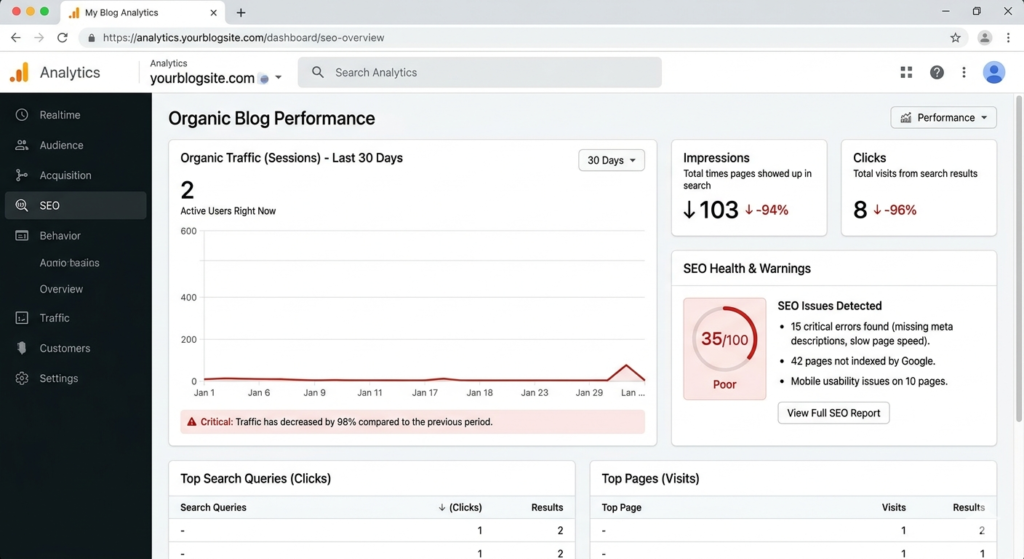
Why Your Website Gets No Traffic: A Quick Answer
If your website gets no traffic, the biggest reasons are usually:
- Poor SEO optimization
- Wrong keyword targeting
- Low-quality or thin content
- Slow website speed
- No backlinks or authority signals
- Weak internal linking
- Ignoring user experience
- Inconsistent content publishing
- Technical SEO issues
In simple words, your website may exist online, but Google may not see enough reasons to rank it.
The result?
No rankings = no clicks = no traffic.
The good part is that once you identify the issue, fixing traffic problems becomes much easier.
The Hard Truth About Website Traffic
Many beginners believe this:
“I launched my website, so traffic should automatically come.”
Unfortunately, that is not how the internet works.
Think of your website like opening a shop in the middle of a giant city.
If nobody knows your shop exists, if there are no signboards, no recommendations, and no directions—why would customers suddenly appear?
Google works in a similar way.
Your website needs visibility, trust, optimization, and useful content before traffic starts coming naturally.
Even successful websites often spent months growing slowly before seeing real results.
Patience matters.
But patience alone is not enough.
You also need strategy.
Mistake #1: You Are Targeting the Wrong Keywords
One of the biggest reasons websites fail is poor keyword selection.
Many beginners either:
Target Extremely Competitive Keywords
For example:
A brand-new website trying to rank for terms like:
- “SEO”
- “Make money online”
- “Best AI tools”
- “Digital marketing”
This is extremely difficult because huge websites already dominate those search results.
Instead, focus on long-tail keywords.
For example:
Instead of:
“Website Traffic”
Try:
“Why my website gets no traffic”
“How to increase website traffic for beginners”
“Website not getting visitors after launch”
These keywords are easier to rank for and attract targeted readers.
You Ignore Search Intent
Sometimes the keyword itself is not the problem.
The problem is intent.
For example:
If someone searches:
How to increase website traffic”
They want practical solutions.
But if your article only explains definitions and theory, readers leave quickly.
Google notices this behavior.
And rankings suffer.
How to Fix This
Use keyword research tools to find realistic opportunities.
Popular tools include:
- Google Keyword Planner
- Ubersuggest
- Ahrefs
- Semrush
- Google autocomplete suggestions
Focus on keywords with:
- Medium or low competition
- Good search intent
- Clear user problems
- Long-tail variations
This single improvement can dramatically improve website traffic over time.
A free keyword research tool like Google Keyword Planner can help you discover realistic keyword opportunities.
Mistake #2: Your Content Is Thin, Generic, or Boring
Let’s be honest.
The internet is full of low-quality content.
Many websites publish articles that sound repetitive, robotic, or copied.
Readers notice.
Google notices too.
If your content does not solve problems, visitors leave quickly.
And low engagement sends bad signals to search engines.
What Bad Content Looks Like
Bad content often:
- Repeats the same ideas
- Feels robotic
- Gives vague advice
- Has no examples
- Uses clickbait without value
- Does not answer real questions
For example:
Bad advice:
“Write good content and traffic will come.”
That sounds nice.
But it does not help anyone.
Good content explains:
- What to write
- How to write
- Why it matters
- Real examples
- Actionable steps
A Real Example
Imagine two fitness blogs.
One says:
“Exercise daily to stay healthy.”
The second explains:
“Walking for 30 minutes daily improves heart health and burns calories. Studies suggest consistency matters more than intensity for beginners.”
Which feels more useful?
Exactly.
Useful content wins.
How to Fix Thin Content
Ask yourself before publishing:
Does this article actually solve a problem?
Your content should:
- Answer user questions clearly
- Include examples
- Use expert insights
- Feel human and conversational
- Include data or practical advice
- Be easy to skim
Also, break large paragraphs into smaller sections.
If you want a deeper strategy, learn how to write blog content that ranks on Google and keeps readers engaged.
Most users scan content instead of reading every word.
Readable content keeps visitors engaged longer.
You can also use some of the best AI tools for bloggers to speed up research, improve writing flow, and generate better content ideas.
Mistake #3: Your Website Has Poor SEO
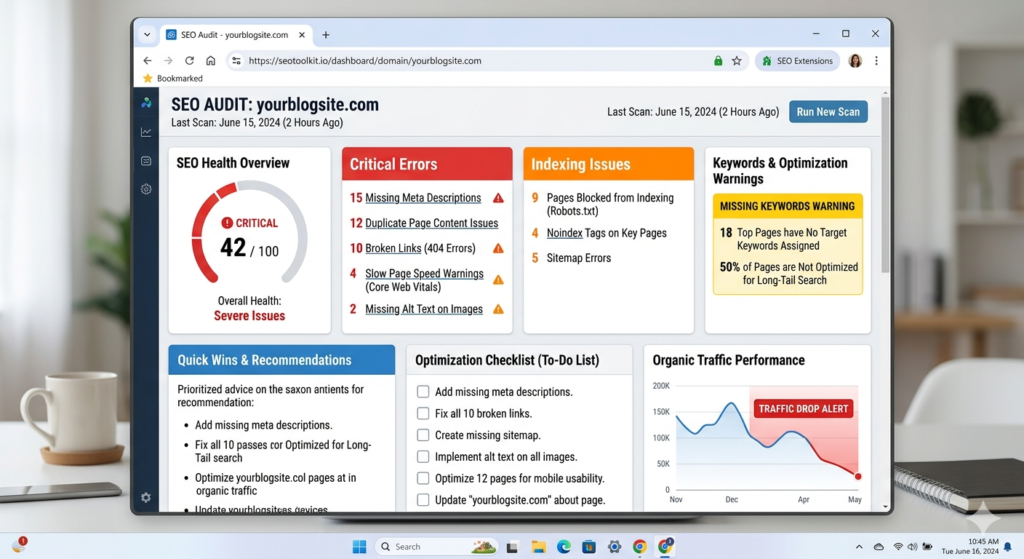
This is where many websites silently fail.
You may have great content.
But if Google cannot properly understand it, rankings become difficult.
SEO helps search engines understand:
- What your content is about
- Who should see it
- Whether it deserves ranking
Without proper SEO, even amazing content may remain invisible.
Common SEO Mistakes
Missing Keyword Optimization
Some websites never use target keywords naturally.
Others stuff keywords everywhere.
Both are bad.
Instead, naturally include keywords in:
- Title
- Introduction
- Headings
- Meta description
- URL
- Image alt text
But keep it natural.
Never force keywords.
Weak Headings Structure
Google loves organized content.
Bad example:
Random paragraphs without structure.
Good example:
- H2 headings
- H3 subheadings
- Clear sections
- Easy navigation
This improves readability and SEO.
If you are confused about organizing headings and formatting, check this guide on the perfect blog structure for SEO to make content easier to rank.
No Internal Linking
Internal links help Google understand your website structure.
Example:
If you write about SEO, link related articles naturally.
This improves:
- User experience
- Crawlability
- Session duration
- SEO performance
Think of internal links as bridges between helpful content.
Mistake #4: Your Website Is Too Slow
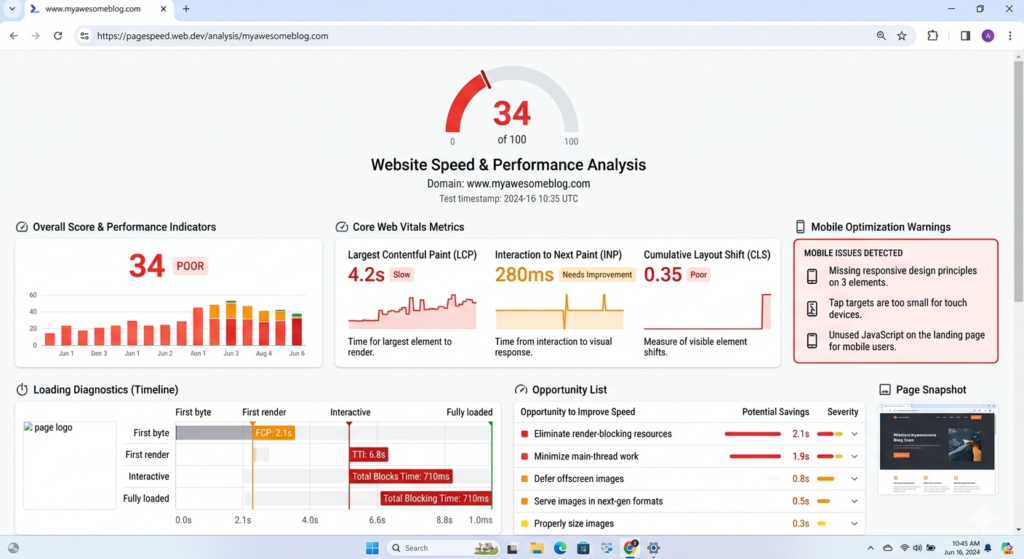
People hate slow websites.
Actually—hate might be an understatement.
Research repeatedly shows that users leave quickly when websites load slowly.
Imagine clicking a website and waiting…
Three seconds.
Five seconds.
Eight seconds.
Most people leave before the page even loads.
And Google knows this.
Website speed affects both rankings and user experience.
Signs Your Website Is Slow
Your website may have speed issues if:
- Images load slowly
- Pages take several seconds to open
- Users bounce quickly
- Mobile experience feels laggy
Common Reasons Websites Become Slow
- Heavy images
- Too many plugins
- Poor hosting
- Broken scripts
- Large page sizes
How to Fix Website Speed
Simple improvements include:
- Compress images
- Use caching plugins
- Choose better hosting
- Remove unnecessary plugins
- Optimize mobile experience
A faster website creates happier users.
And happier users usually mean better rankings.
Mistake #5: Google Has Not Indexed Your Website
Sometimes the problem is surprisingly simple.
Google may not even know your website exists.
Yes, really.
If pages are not indexed, they cannot appear in search results.
That means:
No ranking.
No visibility.
No organic traffic.
How to Check Website Indexing
Go to Google and search:
site:yourwebsite.com
Example:
site:example.com
If pages appear, indexing works.
If nothing appears, Google may not have indexed your website yet.
How to Fix Indexing Problems
- Submit your sitemap in Google Search Console
- Request indexing manually
- Fix crawl errors
- Avoid accidental “noindex” settings
Many beginners completely ignore this step.
Yet it can be the reason behind zero traffic.
Mistake #6: You Have No Backlinks (And No Authority)
Imagine two websites publishing similar content.
One website is mentioned and linked by trusted blogs, websites, and online communities.
The second website?
No links. No mentions. No authority.
Which website do you think Google will trust more?
Exactly.
Backlinks work like trust signals.
When another website links to your content, it tells search engines:
This content is useful.”
That does not mean you need hundreds of backlinks overnight.
In fact, low-quality spam backlinks can hurt more than help.
What Are Backlinks?
Backlinks are simply links from another website to your website.
For example:
A marketing blog linking to your SEO guide.
A business website mentioning your tutorial.
A blogger referencing your research.
These links improve website authority over time
Why Backlinks Matter for Traffic
Backlinks help:
- Improve rankings
- Build trust
- Increase domain authority
- Bring referral traffic
- Help Google discover pages faster
Without backlinks, ranking becomes much harder—especially in competitive topics.
How Beginners Can Get Backlinks
Here are realistic ways:
Create Link-Worthy Content
Publish content people actually want to reference.
Examples:
- Step-by-step tutorials
- Research-backed articles
- Original case studies
- Statistics posts
- Beginner-friendly guides
Guest Posting
Write valuable articles for other blogs in your niche.
You often get a backlink in return.
Answer Questions Online
Platforms like forums and communities can indirectly help visibility when you genuinely help users.
The key word here is:
Genuinely.
Spammy link dropping rarely works.
Mistake #7: You Publish Content Inconsistently
Many website owners do this:
They post five articles in one week.
Then disappear for two months.
Then suddenly return again.
This inconsistency slows growth.
Google generally favors websites that remain active and useful.
That does not mean you must publish daily.
Consistency matters more than frequency.
A Better Publishing Strategy
Instead of publishing randomly:
Try a realistic schedule.
For example:
- 1 quality article per week
- 2 helpful blog posts weekly
- Monthly in-depth guides
Choose a schedule you can actually maintain.
Consistency builds trust.
With users.
And with search engines.
Real-Life Example
Imagine two blogs:
Website A:
Publishes randomly.
Website B:
Publishes one high-quality article every week for six months.
Most of the time, Website B wins.
Slow consistency beats short bursts of motivation.
Mistake #8: Your Website Looks Bad on Mobile
Most internet users browse from smartphones.
If your website feels frustrating on mobile, visitors leave quickly.
And that hurts traffic.
Common Mobile Problems
- Tiny text
- Broken layouts
- Slow loading
- Hard-to-click buttons
- Images that look messy
If readers struggle to use your site, they will not stay.
Google also prioritizes mobile-friendly experiences.
How to Improve Mobile Experience
Ask yourself:
Can someone comfortably read your website on a phone?
If not, fix these:
- Use responsive design
- Improve font readability
- Compress images
- Reduce popups
- Make navigation simple
A clean mobile experience often improves rankings and engagement.
Mistake #9: Your Website Experience Is Confusing
Sometimes traffic problems are not about SEO.
They are about user experience.
Imagine landing on a website where:
- Ads are everywhere
- Navigation feels confusing
- Fonts are unreadable
- Content feels cluttered
Would you stay?
Probably not.
Users decide quickly whether a website feels trustworthy.
Signs of Bad User Experience
Your website may have UX problems if:
- Bounce rates are high
- Visitors leave quickly
- Pages feel cluttered
- Menus confuse people
- Content is hard to read
How to Improve User Experience
Keep things simple.
Use:
- Clear headings
- Short paragraphs
- White space
- Easy navigation
- Fast loading pages
Sometimes, removing clutter improves results more than adding features.
Mistake #10: You Ignore Technical SEO
Technical SEO sounds scary.
But many fixes are surprisingly simple.
Think of technical SEO as helping search engines properly access and understand your website.
Common Technical SEO Problems
Broken Links
Broken pages create bad experiences.
Check regularly for:
- 404 errors
- Dead internal links
- Missing pages
Duplicate Content
Google dislikes repetitive content across multiple pages.
Avoid publishing nearly identical articles.
Missing Sitemap
A sitemap helps search engines understand website structure.
Without one, crawling becomes harder.
Poor URL Structure
Bad URL:
website.com/post123?id=987
Better URL:
website.com/why-website-gets-no-traffic
Simple URLs improve readability and SEO.
Mistake #11: You Expect Traffic Too Fast
This mistake hurts motivation more than rankings.
Many beginners think:
“I published three articles. Why am I not ranking?”
The truth?
SEO usually takes time.
Sometimes months.
Especially for new websites.
That does not mean failure.
It means growth is happening slowly.
A Realistic Timeline
For many new websites:
Month 1: Low traffic
Month 2–3: Small impressions
Month 4–6: Some rankings begin
Month 6+: Stronger momentum
Results depend on competition, quality, niche, and consistency.
Patience matters.
But patience combined with smart SEO matters more.
Quick Checklist: Why Your Website Gets No Traffic
If traffic is low, check these:
✅ Are you targeting realistic keywords?
✅ Is your content genuinely helpful?
✅ Is SEO optimized properly?
✅ Is the website fast?
✅ Is Google indexing pages?
✅ Are you getting backlinks?
✅ Is content consistent?
✅ Is mobile experience good?
✅ Is navigation easy?
✅ Are technical SEO issues fixed?
Even fixing a few of these can improve performance.
Expert Tips to Increase Website Traffic Faster
Here are practical strategies beginners can use:
Update Old Content
Sometimes old articles simply need refreshing.
Add:
- Better examples
- Updated statistics
- New headings
- Improved readability
Fresh content often performs better.
Focus on One Topic Cluster
Instead of random content, create related articles.
Example:
If your niche is blogging:
Write about:
- SEO basics
- Traffic growth
- Keyword research
- Blogging mistakes
- Content writing
Topic relevance helps authority.
Improve Click-Through Rate (CTR)
Bad title:
“SEO Tips”
Better title:
“10 SEO Mistakes Destroying Your Website Traffic”
More clicks often mean more traffic opportunities.
Write for Humans First
Many people obsess over algorithms.
But Google increasingly rewards useful content.
Ask:
“Would a real person find this genuinely helpful?”
If yes, you are moving in the right direction.
Frequently Asked Questions (FAQs)
Why is my website getting no traffic?
Usually because of poor SEO, weak keyword targeting, low-quality content, indexing issues, lack of backlinks, or slow website performance
How long does it take for a website to get traffic?
It depends on competition and SEO quality, but many websites take several months before seeing consistent organic traffic.
Can a website rank without backlinks?
Yes, especially for low-competition keywords. However, backlinks usually help improve trust and rankings faster.
Does website speed affect SEO?
Yes. Slow websites often create poor user experiences, which can negatively affect rankings and engagement.
How often should I publish content?
Consistency matters more than frequency. One quality article per week is better than random publishing.
Final Thoughts: Stop Guessing and Fix the Real Problems
If your website gets no traffic, do not panic.
Most websites struggle in the beginning.
The biggest difference between websites that fail and websites that grow is simple:
Besides SEO, smart website owners also use free traffic sources for bloggers to grow visitors faster without spending money on ads.
One group quits.
The other improves.
Traffic problems are usually fixable.
Start small.
Fix keyword mistakes.
Improve content.
Optimize SEO.
Speed up your website
Stay consistent.
And most importantly—give your website time to grow.
Because once the right foundation is in place, traffic becomes much easier to build.
The goal is not overnight success.
The goal is long-term growth that keeps bringing visitors month after month.